Football Data to CSV: A Tested No-Code Match-Table Export
By Ashesh DhakalUpdated 4 min read
To turn a public football results page into a spreadsheet, name the match fields you need, check the returned rows against the page, and export the table. Keep the same columns on subsequent runs so the files combine cleanly.
I built Website Scraper. On October 7, 2026, I ran a fresh extraction against Statarea's October 5 competition page. It returned 28 rows and five columns. The downloads contain the full result of that test.
What the test returned
We requested competition, home_team, away_team, match_time and final_result. These are the first five rows, with the source's display values preserved:
| Competition | Home team | Away team | Time as displayed | Final result as displayed |
|---|---|---|---|---|
| International-Uefa Nations League A Grp. 1 | France | Belgium | 20:45 | 4:1 |
| International-Uefa Nations League A Grp. 1 | Italy | Turkey | 20:45 | 3:1 |
| Argentina-Liga Profesional Clausura Grp. B | Argentinos Jrs | Tigre | 00:15 | 2:1 |
| Argentina-Liga Profesional Clausura Grp. B | Estudiantes R.C. | Racing Club | 02:30 | 1:2 |
| Uruguay-Liga Auf Clausura | Racing Montevideo | Penarol | 00:30 | 0:1 |
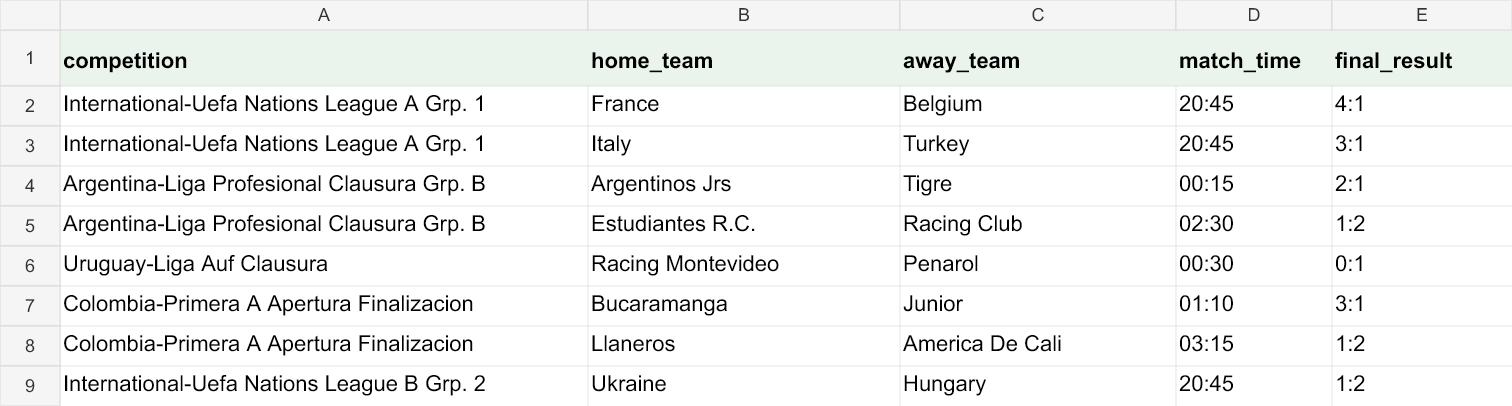
The test ran at 07:34 UTC. We spot-checked team pairs and scores against the fetched page, then checked every exported cell against the extraction output. The export reproduces that output; sporting accuracy still depends on the source. The page also contains predictions and other statistics, which were excluded from this table.
1. Start with a specific results page
Open the source in your browser first. Confirm the date, competition and visible matches. A homepage, login screen or a page that has not loaded its results may not contain the table you expect.
Paste that URL into Website Scraper. The first scrape can be tried without an account. Sign in to export your own result or save the scraper. The sample files on this guide are available without signing in.
Use public pages you are permitted to access, respect the source's terms, and keep the source URL with the exported data. This example is a snapshot of one page, not a guarantee that every sports site or every future layout will work.
2. Ask for fields rather than a general summary
This was the instruction used in the test:
Football matches: competition, home team, away team, match time
and final result as displayed. Do not include odds, predictions,
percentages or betting advice. Use blank for a missing final result.
We used the five column names above as the extraction schema. In the app, review the first result, remove columns you do not need and refine the instruction if necessary. Save the scraper when the table has the shape you want; subsequent saved runs retain that column order and leave unavailable fields blank.
Avoid mixing full-time results, half-time results and predictions in one column. A value can be copied accurately from the page and still be the wrong field for your analysis.
3. Check missing values and time zones
The sample includes matches without a final result. Those cells remain blank. They are not treated as 0:0, and another statistic is not substituted for the missing result.
Match times are the strings shown on the source. We did not convert them to UTC or infer a time zone. A page date and a date embedded in a match-detail link can differ; do not automatically combine them into a timestamp without checking how the site defines its dates.
Before aggregating a larger export, compare several rows with the source and check that the number of matches looks reasonable. Use explicit identifiers or a combination of date, competition and team pair to find duplicates when joining multiple exports.
4. Choose CSV or XLSX deliberately
CSV is convenient for scripts and databases. When opening it in a spreadsheet, import match_time and final_result as text if you need exact display values. Automatic type detection can interpret a result such as 4:1 as a time.
The Excel export stores those strings as text, keeps a frozen header and adds filters. The Source sheet records the page URL and export time; this sample also records its capture time. The downloadable JSON contains the same 28 rows if you prefer to load the records into a program.
5. Save the columns for the next collection
After a successful scrape, choose Save & reuse columns. Give the scraper a name you will recognize, then rerun it from your saved scrapers when you need a fresh copy of that page.
A dated URL stays dated. Saving the October 5 URL does not make it advance to October 6. Choose the next date intentionally, or use a source page that you have verified always shows the current data.
If your task is to hear about changes to the same page, website monitoring is the related workflow. For occasional spreadsheet pulls, saving and rerunning the scraper is enough.
One credit covers one page, not one match row. The pricing page explains the free allowance, subscriptions and one-time packs. Check your page and output first; scale up only after the fields and missing-value behavior match your needs.