7 Best AI Web Scrapers in 2026
By Ashesh DhakalUpdated 9 min read
Every AI scraping tool makes the same promise: point it at a page, get clean data back. The differences show up in week two, when the credit balance drains faster than the math suggested or a robot needs retraining after a redesign. This list compares seven AI web scrapers, including my own website scraper tool, on what matters after the demo: pricing honesty, extraction quality, and maintenance burden.
Disclosure before anything else, because it colors the whole list. Website Scraper is mine. I built it, I run it, and I've put it first — judge that bias for yourself. What I offer in exchange is the same "honest cons" treatment for my product that everyone else gets, and those cons are real ones a competitor would happily quote. Two kinds of knowledge feed this piece: Website Scraper I know from the builder's side (the refund ledger, the extraction logs, which sites fail and why), while the other six I know from documented research on their own pricing pages and docs. Every number below was verified against the vendor's published pricing as of July 2026, with links so you can check my work.
What should you look for in an AI website scraper?
Four things: extraction that survives redesigns because it reads meaning rather than markup, per-page pricing that doesn't charge for failures, built-in scheduling and change monitoring, and exports that land where you work. Be suspicious of any tool where credits quietly expire, or where "AI" means a chatbot bolted onto a selector engine.
The credit fine print is where buyers get burned. Some tools charge one credit per page, others per row of output, and others per browser-minute. The same 500-row product listing can cost 1 credit on one tool and 500 on another, which is a difference of hundreds of times in effective price for identical output. I flag each tool's credit unit below.
Comparison table: 7 AI website scrapers at a glance
| Tool | Best for | Free tier | Entry paid plan | Credit unit | Credits expire? |
|---|---|---|---|---|---|
| Website Scraper | No-code tables + change monitoring | 25 credits/mo | $19/mo — 1,000 credits | 1 credit = 1 page | Monthly reset; packs never expire |
| Browse AI | Prebuilt robots, site monitoring | 50 credits/mo | $19/mo annual (2,000/mo billed monthly at $48) | ~1 credit ≈ 10 rows | Monthly |
| Thunderbit | Quick in-browser scrapes | 6 pages/mo | $9/mo — 5,000 credits/yr | 1 row = 1 credit | Annual allotment |
| Octoparse | Complex point-and-click workflows | 10 tasks, local runs | ~$69/mo annual | Task-based | n/a (task limits) |
| Bardeen | GTM/sales browser automation | 100 credits/mo | $10/mo — 100 credits | 1 row = 1 credit | Yes, each period |
| Firecrawl | Developer API, LLM pipelines | 1,000 credits/mo | $16/mo annual — 5,000 credits | 1 credit = 1 page | Monthly, no rollover |
| ParseHub | Visual scraping of tricky sites | 200 pages/run | $189/mo | Pages per run | n/a (run limits) |
Pricing sources: Browse AI, Thunderbit, Octoparse, Bardeen, Firecrawl, ParseHub. Verified July 2026; annual-billing prices where noted.
1. Website Scraper — best for no-code table extraction and monitoring
Mine, as disclosed. Here's the case for it, then the case against.
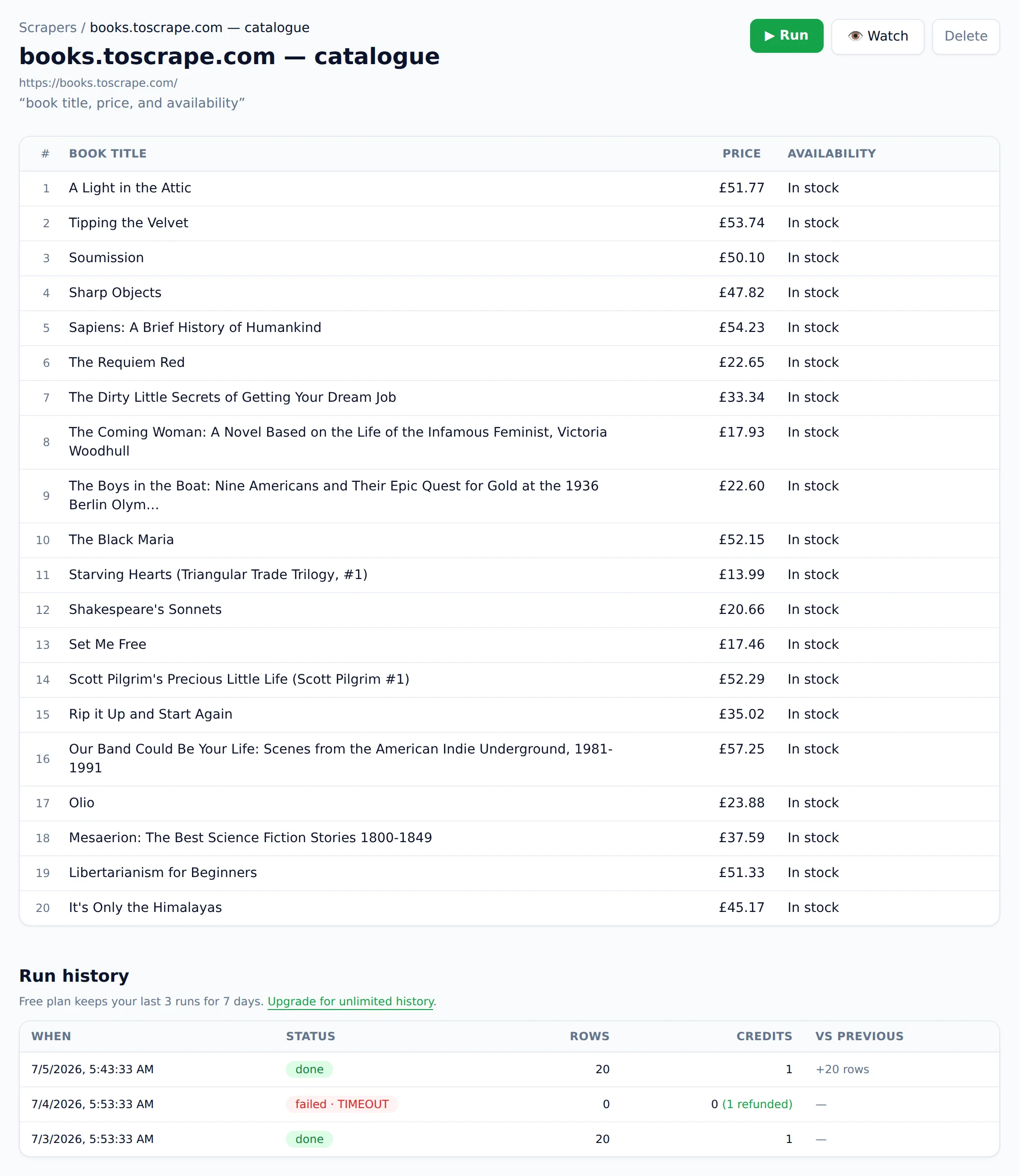
What it does best. Paste a URL, describe the data in plain English ("product name, price, rating"), get a clean table. No selectors, no robot training, no workflow builder. Extraction reads the page by meaning, so it keeps working through redesigns, and it's built for the JavaScript-heavy sites simpler fetchers choke on: React apps, infinite scroll, late-loading content. Saved scrapers run on a schedule, and change monitoring compares extracted data against what you said matters. An alert means a price or stock status actually moved, with a note on why it fired, not that a timestamp rotated.
Pricing. Free tier: 25 credits/month, 1 credit = 1 page. Paid: Starter $19/mo (1,000 credits), Pro $49 (5,000), Business $129 (25,000), Scale $299 (100,000). One-time credit packs ($9 for 300, $29 for 1,200) never expire, and failed scrapes are never charged — the refund is automatic. Both policies exist because I think a bill should read like a receipt: pages that returned data, nothing else.
Honest cons. No browser extension, so you can't scrape a page you're currently logged into; Thunderbit beats us there. No self-serve support for sites behind logins. Very large crawls, in the millions of pages, belong on a developer API like Firecrawl, not here. And if you need multi-step browser automation (click, type, submit forms), this is not an automation tool and I'm not pretending otherwise.
Pick it if you want a URL turned into a table in under a minute and billing you never have to think about.
2. Browse AI — best for prebuilt robots and deep monitoring
What it does best. Browse AI's model is "train a robot once, run it forever." It has a large library of prebuilt robots for popular sites, solid change monitoring, and integrations including Google Sheets and Zapier. Plans include residential proxies.
Pricing. Free: 50 credits/month, 2 websites. Personal: $19/mo billed annually ($48 billed monthly, 2,000 credits/mo). Professional: $69/mo annual. Premium starts around $500/mo. One credit typically extracts about 10 rows or captures a screenshot (source).
Honest cons. Robot training is real setup work next to pasting a URL, and the annual-versus-monthly gap on Personal is steep: $19 against $48. The row-based credit math takes spreadsheet time before you can compare it with per-page pricing. Website limits on the lower tiers (2–10 sites) pinch if you scrape broadly.
Pick it if you monitor a handful of specific sites intensively and want prebuilt robots. Deciding between Browse AI and my tool specifically? The Website Scraper vs Browse AI comparison goes feature by feature.
3. Thunderbit — best for quick in-browser scrapes
What it does best. Thunderbit is a Chrome extension. Its "AI Suggest Columns" feature reads the page you're on and proposes a schema in two clicks, and because it runs inside your browser it can scrape pages you're logged into — the one job my tool can't do. Exports to Sheets, Airtable, and Notion are free.
Pricing. Free: 6 pages/month. Starter: $9/mo (5,000 credits/year). Pro: from $16.50/mo (30,000 credits/year). Credits are charged per output row (1 row = 1 credit; subpages 2 credits) (source).
Honest cons. Per-row billing means large tables burn credits fast; one 1,000-row page costs 1,000 credits. The free tier, at 6 pages, is a demo rather than a plan. And as an extension it's tied to your open browser, so scheduled cloud scraping is more limited than on server-based tools.
Pick it if you scrape small tables from pages behind your own login. For the full head-to-head, see Website Scraper vs Thunderbit.
4. Octoparse — best for complex point-and-click workflows
What it does best. Octoparse is the veteran no-code scraper: a desktop app with a visual workflow builder that handles pagination, infinite scroll, dropdowns, and multi-step navigation. Paid plans add cloud extraction, IP rotation, and automatic CAPTCHA solving (source).
Pricing. Free: 10 tasks, local extraction, up to 50,000 exported rows/month. Standard: from $69/mo billed annually (100 tasks). Professional: $249/mo annual (250 tasks).
Honest cons. Under the AI assists it's still a selector and workflow tool, so a site redesign can break tasks that then need repair. The desktop learning curve is real; budget an afternoon before your first reliable multi-page task. It's also the most expensive way on this list to scrape simple pages.
Pick it if your target sites need complex click-through navigation that simpler tools can't express.
5. Bardeen — best for sales and GTM browser automation
What it does best. Bardeen is browser automation aimed at go-to-market teams: scrape a search-results page or profile list, enrich it, qualify leads with AI, and push everything to Sheets, Airtable, or Notion as one automation. Scraping is one action type among many.
Pricing. Free: 100 credits/month. Basic: $10/mo (100 credits). Premium: $50/mo (1,000 credits). Scraping costs 1 credit per row; enrichment 3 credits per row. Unused credits expire at the end of each billing period (source).
Honest cons. Credit expiry plus per-row billing makes it an expensive way to do pure extraction; 1,000 rows consumes the entire Premium monthly allotment. If what you want is tables of data rather than automated GTM workflows, you're paying for machinery you won't use.
Pick it if scraping is one step in a sales workflow you want automated end to end.
6. Firecrawl — best developer API for AI pipelines
What it does best. Firecrawl is an API, not a no-code tool. It turns URLs into clean markdown or structured JSON, crawls whole sites, and is built for feeding LLMs and RAG pipelines. It's well-documented, and the free tier (1,000 credits) is the most generous on this list. When someone outgrows tools like mine, this is usually where I point them.
Pricing. Free: 1,000 credits/month. Hobby: $16/mo annual (5,000 credits). Standard: $83/mo annual (100,000). Scrape/crawl costs 1 credit per page; monitoring costs 1 credit per page per check. Credits do not roll over on standard monthly plans (source).
Honest cons. You have to write code; there's no UI where a non-developer builds a table from a page. Extraction to a custom schema costs extra credits beyond plain scraping. For a marketer or analyst without engineering support, it's the wrong tool.
Pick it if you're a developer building scraping into an application or LLM pipeline. (Deciding between code and no-code? My Python web scraping tutorial shows what the code route actually involves.)
7. ParseHub — best free visual scraper for tricky sites
What it does best. ParseHub is a free desktop app with a click-to-select visual model that handles JavaScript-heavy sites, conditionals, and nested templates. The free plan's 200 pages per run is enough for real small projects, not just demos.
Pricing. Free: 200 pages/run, 5 public projects, 40-minute run limit. Standard: $189/mo (5,000 pages/run, scheduling, API, IP rotation). Professional: $599/mo (source).
Honest cons. The jump from free to $189/mo is the steepest entry price here. It's selector-based at heart, so redesigns break projects. Development has been slow in recent years, and the free tier's cloud limitations (no scheduling, public projects) constrain serious use.
Pick it if you need visual scraping of complex sites and can live within the free tier.
Which AI scraper should you actually choose?
Match tool to job: Website Scraper for no-code tables and change alerts, Thunderbit for pages behind your own login, Browse AI for robot-based monitoring of a few sites, Octoparse or ParseHub for click-through workflows, Firecrawl for developer pipelines, Bardeen for sales automation where scraping is one step of several.
A simple decision path:
- "I have a URL and want a spreadsheet" → Website Scraper
- "The page is behind my login" → Thunderbit or Bardeen (browser-based)
- "I need to click through menus and forms to reach the data" → Octoparse or ParseHub
- "I'm feeding an LLM or building an app" → Firecrawl
- "I want alerts when specific pages change" → Website Scraper or Browse AI
Whatever you pick, run the same real page through two or three free tiers before subscribing. Extraction quality on your target sites matters more than any ranking, mine included. If you're new to the whole category, start with how to scrape data from a website.
And if the paste-a-URL approach sounds like your speed, the free plan includes 25 page scrapes a month. No credit card, and failed scrapes never count against you.