AI Web Scraping in 2026: How It Works and When to Use It
By Ashesh DhakalUpdated 11 min read
"Can AI scrape websites?" is a settled question. Yes, and in 2026 it's often the default way to do the job. The questions worth your time are how an AI web scraper actually turns a messy page into clean rows, what that costs against the old way, and when the old way still wins. I build one of these tools for a living, so this guide answers from the inside, including the failure modes vendors don't usually volunteer. Mine included.
How does AI web scraping actually work?
An AI scraper fetches the URL, renders it in a headless browser so JavaScript content loads, converts the rendered page into text a model can read, and passes that to a language model with your extraction instructions. The model returns structured JSON matching your fields; the tool validates it and shows you a table.
Step by step, here's what happens between "paste URL" and "download CSV":
- Fetch and render. The tool loads the page in a real browser engine, because most modern sites build their content with JavaScript. The raw HTML a
curlrequest sees is often an empty shell; the rendered page is the real one. This step is also where good tools earn their keep on hard targets: if a page pushes back, the fetcher automatically tries harder instead of just returning an error. There are limits, though — I tested one AI scraper across 13 popular sites and the heavily-defended giants (Amazon, Zillow, AliExpress) blocked it outright, while the other 10 came back clean. - Reduce to signal. The rendered DOM gets converted into a compact representation the model can read: cleaned HTML, markdown, or an accessibility tree. Menus, ads, cookie banners, and footers are stripped before extraction, so the model reads content rather than chrome.
- Extract against a schema. Your plain-English description ("product name, price, star rating, in stock?") becomes a schema. The LLM reads the page content and emits JSON that conforms to it, one object per item it finds.
- Validate and repair. Good tools check the output. Are prices actually numbers? Are required fields present? Does each extracted value appear in the source page? Failures trigger a retry or an error — and in Website Scraper's case, a failed scrape is never charged. The credit refund is automatic.
- Deliver. The validated rows land in a table you export as CSV, JSON, or XLSX, or push onward via API.
The shift from traditional scraping is that the model locates data by meaning, not by position. It finds "the price" the way a person skimming the page would, rather than by following a brittle address like div.product-card > span.price-now:nth-child(2).
What's the difference between AI extraction and CSS selectors?
Selectors tell the computer where data lives in the HTML tree; AI extraction tells it what the data means. Selectors are fast, cheap, and deterministic, and they break whenever the markup changes. AI extraction costs more per page but survives redesigns and handles pages that were never structured consistently.
| CSS selectors / XPath | AI extraction | |
|---|---|---|
| How it targets data | HTML structure (.price > span) | Semantic meaning ("the price") |
| When the site redesigns | Breaks; needs manual repair | Usually keeps working |
| Inconsistent page layouts | Needs one selector set per layout | One instruction covers all |
| Cost per page | Fractions of a cent (compute only) | Higher (LLM inference) |
| Determinism | Byte-exact, repeatable | Very consistent, not guaranteed identical |
| Setup skill | Developer writes/records selectors | Plain-English description |
| Maintenance | Ongoing — the hidden cost | Near zero |
The maintenance row decides most real-world cases. A selector scraper isn't a one-time cost; it's a subscription paid in developer hours. Industry surveys have long found that a large share of scraper engineering time goes to fixing broken extractions rather than building new ones, and anyone who has maintained a fleet of spiders will recognize the pattern. If you want to feel the difference in your own fingers, my Python web scraping tutorial builds a selector-based scraper by hand.
When does AI scraping beat traditional scraping?
AI wins when pages change often, when layouts vary across your targets, when nobody's available to maintain selectors, or when you need results in minutes. It's the right default below roughly 100,000 pages a month, and for any monitoring job where resilience matters more than per-page cost.
Concretely, AI extraction is the better choice when:
- The site redesigns under you. E-commerce sites, news sites, and marketplaces change markup constantly. Semantic extraction shrugs; selectors shatter.
- You're scraping many different sites. Fifty supplier websites means fifty selector sets to write and maintain, or one plain-English schema applied to all fifty.
- The pages are messy. Inconsistent formatting, data embedded in prose, fields that move around from page to page. Selectors can't express "find it wherever it is." A model can.
- Nobody on the team codes. The entire setup is describing what you want.
- You're monitoring for change. This is the case I care about most, because it's where most tools quietly fail their users. A raw HTML diff cries wolf on every timestamp and rotating banner, and after a week you mute the channel. A monitor that weighs each change against a rule you wrote yourself, and tells you why it alerted, is the difference between alerts you act on and alerts you ignore. The standard worth demanding: no noise, ever.
When is traditional scraping still the right choice?
At very high volume on stable, uniform sites. If you're pulling millions of identical product pages from one domain whose template hasn't moved in years, per-page LLM cost dominates and selectors win. It's also right when you need strict determinism, sub-second latency, or everything inside your own infrastructure.
Run the numbers honestly. If you scrape 5 million pages a month from one site whose template hasn't changed in three years, a developer-maintained scraper costs compute measured in dollars plus occasional maintenance. AI extraction at even $0.003/page would be $15,000/month. That's not a close call, and I'll happily tell you not to use a tool like mine for it.
The crossover point depends on your volumes, how often targets change, and what developer time costs you. My rough rule: below ~100K pages/month across changing or varied sites, AI is usually cheaper all-in once you count maintenance hours. Above ~1M pages/month on stable sites, selectors usually win. In between, hybrid approaches are common — use AI to generate selectors, run them deterministically, and regenerate when they break.
How much does AI web scraping cost?
Between $0.003 and $0.02 per page from no-code tools, depending on plan size, with free tiers for testing. Website Scraper charges 1 credit per page: $19/month buys 1,000 credits (about 1.9¢ a page), $299 buys 100,000 (about 0.3¢). Failed scrapes are free and one-time packs never expire.
Three cost-model details to check before subscribing to any tool, mine included:
- The credit unit. Per page is easy to predict. Per row is not; a single listing page with 500 rows can cost 500 credits on row-billed tools. Per browser-minute is the hardest of all to forecast.
- Expiry policy. Several popular tools expire unused credits monthly with no rollover. If your usage is spiky, a big project one month and nothing the next, expiring credits mean paying for capacity you never use. Non-expiring packs fit spiky usage better.
- Failure billing. Pages fail: timeouts, blocks, empty responses. Some tools charge for attempts; others only charge for successful extractions. On hard-to-scrape sites the difference can be a double-digit percentage of the bill.
The test I apply to any vendor, my own included: can you read the bill like a receipt and account for every line? If the answer involves a spreadsheet and a support ticket, keep shopping.
How accurate is AI extraction — and can it hallucinate?
Highly reliable on well-defined fields, not infallible. Models occasionally misattribute a value, grabbing a "was" price instead of the current one, and very rarely output something not on the page. Serious tools counter with schema validation, type constraints, grounding checks against the source, and retries.
The realistic failure modes, in descending order of frequency:
- Misattribution. The value exists on the page but belongs to a different item — the price from the "customers also bought" carousel, not the main product. Mitigation: tight schemas and page-region awareness.
- Format drift. "1.299,00 €" parsed with the wrong locale, or a date read day-first instead of month-first. Mitigation: typed schemas that force normalization and reject non-conforming values.
- Omission. The model returns 48 of 50 rows on a long page. Mitigation: count checks against page structure and automatic re-extraction.
- True hallucination. A value that appears nowhere in the source. Rare with grounded extraction, but nonzero. Mitigation: verify every extracted string against the fetched content and flag or fail anything unverifiable.
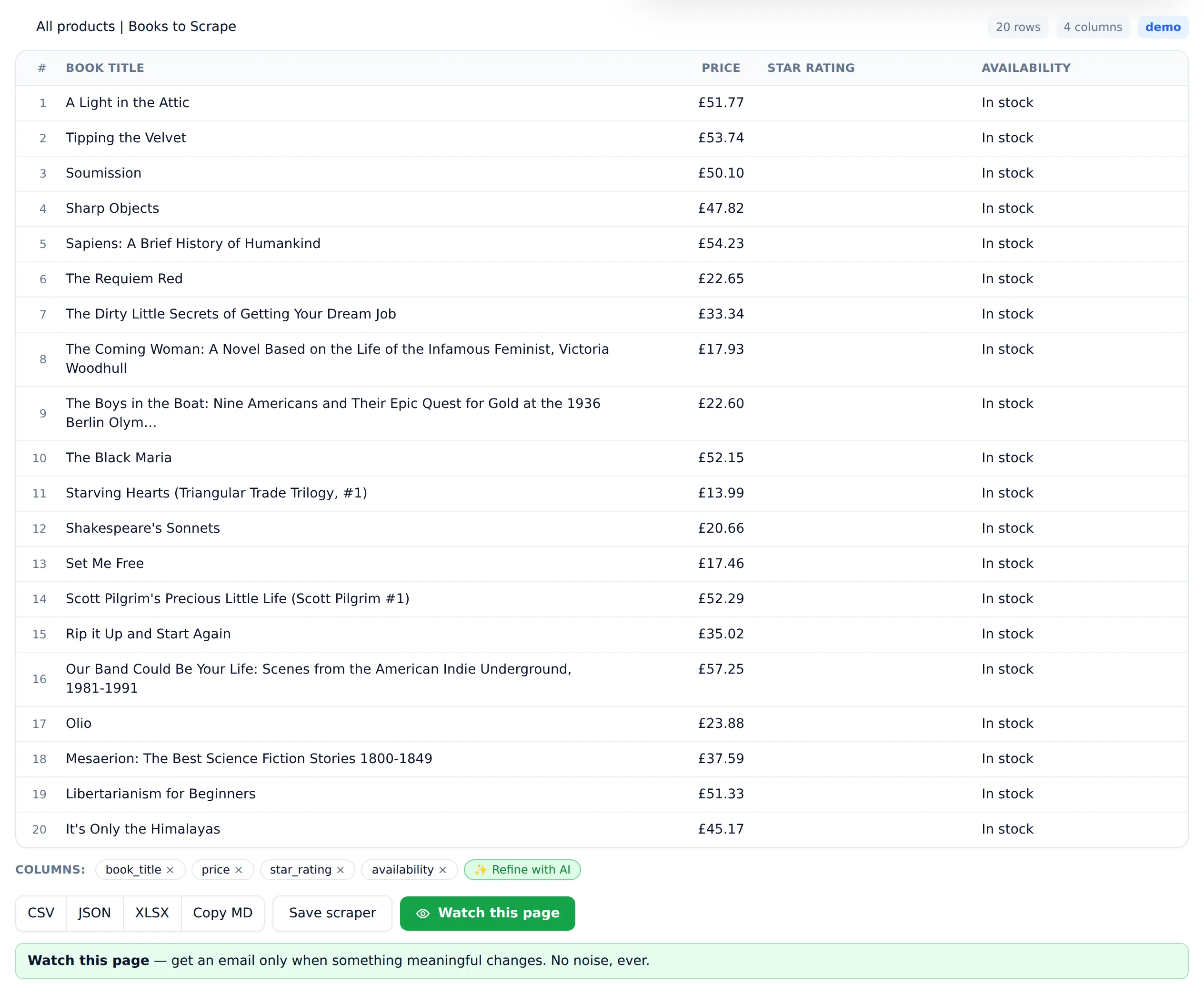
A concrete test from my own build. During development I pointed the extractor at a deliberately content-free page and asked it for products — and early versions invented plausible-looking ones, names and prices included. That test is the reason Website Scraper's default prompt now forbids fabrication outright: run it today and the empty page returns zero rows and a "no table-worthy data found" message instead of fiction, and the empty result is never charged. The same prompt against a real catalogue page returns all 20 real rows. Judge any extraction tool by what it does when the data isn't there.
Practical advice, whatever tool you use: spot-check the first run against the live page, write specific field descriptions ("current sale price in USD, not the crossed-out original price") instead of vague ones, and treat alerts on changed values as prompts to verify rather than gospel. Where extracted data feeds decisions with money attached, keep a human review step on new scrapers until they've earned trust.
Can an AI agent scrape the web?
Yes, in two quite different senses, and the distinction matters for cost. In the first, the agent drives a browser itself — clicks, scrolls, reads the screen — and decides what to do next on every page. Impressive to watch, but slow and expensive per page, since each step is another model call, and errors compound across steps. In the second, the agent calls a web scraper as a tool and gets structured rows back from one request. That's far cheaper and much easier to verify, because extraction becomes a single testable call instead of a chain of screen-reads.
For recurring data needs, the second pattern wins almost every time. If you're building an agent that needs "current prices from this page" as one step of a bigger job, give it a scraping tool — Website Scraper's API returns typed columns and rows from a single POST — and let the agent spend its reasoning budget on what to do with the data rather than on operating a browser.
Is AI web scraping legal?
Scraping publicly accessible data is generally lawful in the United States; hiQ Labs v. LinkedIn held that reading public pages isn't "unauthorized access" under the CFAA. That's not blanket permission: terms of service, copyright, database rights, and privacy laws like GDPR and CCPA still apply, especially to personal data.
This section is background, not legal advice; for the full treatment — the CFAA, terms of service, copyright, and GDPR — see the dedicated guide on whether web scraping is legal, and talk to a lawyer about your specific situation. The practical contours in 2026:
- Public vs. gated. The strongest legal position is scraping data anyone can see without logging in. Bypassing a login, paywall, or technical block weakens that position substantially — hiQ itself distinguished public pages from password-protected ones (Ninth Circuit opinion, 2022).
- Terms of service. Even where scraping isn't a crime, it can still be a breach of contract if you've accepted a site's terms. The risk here is mostly civil (account bans, cease-and-desist letters) but real for business use.
- Personal data. Scraping names, emails, or profiles of EU or California residents pulls you into GDPR/CCPA territory regardless of how public the data is. Regulators including the EU data protection authorities have issued joint statements specifically about mass scraping of personal data. Tread carefully or don't.
- Copyright. Facts (prices, specs, availability) aren't copyrightable in the US; creative expression (articles, photos, reviews) is. Extracting facts into a table is the safer end of the spectrum; republishing scraped content wholesale is the risky end.
- Being a good citizen. Rate-limit your requests and don't hammer small sites. Beyond basic decency, aggressive scraping is exactly what triggers blocks and legal attention.
Since I'm asking you to scrape responsibly, here's how the tool I run behaves: Website Scraper honors robots.txt, doesn't bypass technical protections, and refuses whole categories outright — banks, government portals, people-search sites. I'd shop for that posture in any vendor. One willing to bypass anything on your behalf is also one happy to let you carry the resulting risk alone.
Should you use AI for your scraping project?
Use AI extraction if you don't write code, if your target sites change or vary, if volume is under roughly 100K pages a month, or if you're monitoring pages for meaningful change. Stay with selectors, or a hybrid, for massive uniform workloads where per-page cost is the binding constraint.
If you're still mapping the landscape, start with the fundamentals in how to scrape data from a website, or see what the no-code route covers end to end in my guide to web scraping without code.
And if you'd rather test than read: the free plan gives you 25 page scrapes a month to run your real URLs through. No credit card, and failed scrapes never cost a credit.