Thunderbit Alternative: Website Scraper vs Thunderbit
By Ashesh DhakalUpdated 9 min read
People rarely leave Thunderbit because the extension stopped being clever. They leave over mechanics: row-based credits that make a scrape's cost unknowable until it finishes, an extension that runs one foreground scrape at a time and ties interactive work to an open browser, and headline prices that assume annual billing — the $9/month Starter is $15 if you pay monthly. I built Website Scraper, a cloud web app that turns any page into a clean data table, so read this comparison knowing the author has a horse in the race. I'll also tell you plainly when Thunderbit is the better buy. For some workflows it clearly is.
Two things can be true at once: Thunderbit's two-click "AI Suggest Fields" flow is one of the fastest in-browser grabs available, and a Chrome extension is the wrong shape for scraping you want running while your laptop is closed. This page lays out verified 2026 pricing for both products, the cases where Thunderbit honestly wins, and a ten-minute migration path if you decide to move.
What is Thunderbit?
Thunderbit is an AI web scraper delivered as a Chrome extension. You open a page, click "AI Suggest Fields," and its AI (reported to run on Google Gemini) proposes columns and extracts the data — often in two clicks, with no CSS selectors or code. It supports subpage scraping (following links to detail pages for extra fields), bulk scraping of URL lists, scheduled scrapers that run server-side, and free exports to Excel, Google Sheets, Airtable, and Notion, which many competitors gate behind paid tiers.
Pricing is credit-based and row-based: roughly one credit per output row, with subpage rows costing two credits. Per third-party reviews such as CriticNest's Thunderbit review and ColdIQ's overview, the Starter plan runs $15/month (or $9/month billed annually with 5,000 credits/year) and Pro runs $38/month (or around $16.50/month on a current annual offer with 30,000 credits/year), with a custom-priced Business tier above that. Confirm current numbers on Thunderbit's pricing page.
Website Scraper vs Thunderbit: side-by-side comparison
The Thunderbit figures below come from thunderbit.com/pricing and the third-party reviews linked above; I checked them on July 4, 2026. Promotional annual rates change, so verify before buying.
| Website Scraper | Thunderbit | |
|---|---|---|
| Form factor | Cloud web app — nothing to install, runs server-side | Chrome extension (scheduled jobs run server-side) |
| Entry paid plan | Starter: $19/mo — 1,000 credits, 5 monitors, daily checks | Starter: $15/mo, or $9/mo billed annually — 5,000 credits/year, up to 5 scheduled scrapers |
| Mid tier | Pro: $49/mo — 5,000 credits, 25 monitors, hourly checks, API + webhooks | Pro: $38/mo, or ~$16.50/mo on annual offer — 30,000 credits/year, up to 25 scheduled scrapers, 5-min frequency |
| High tier | Business: $129/mo — 25,000 credits, 100 monitors, 15-min checks; Scale: $299/mo — 100,000 credits, unlimited monitors | Business: custom pricing |
| Free tier | 25 credits/mo, recurring, no card | Small one-time page allowance, no card (check their pricing page for the current number) |
| Credit model | 1 credit = 1 page, any number of rows; failed scrapes never charged; packs ($9→300, $29→1,200) never expire | ~1 credit per output row; subpage rows ~2 credits; credits granted per billing year |
| Extraction method | Paste URL + plain-English description → AI returns a table | Open page in Chrome, AI Suggest Fields → extract |
| Monitoring | Alert rules filter every change — only matches alert; daily / hourly / 15-min by plan | Scheduled re-scrapes (hourly on Starter, down to 5-min on Pro); delivers fresh data, you diff it |
| Exports | CSV, JSON, XLSX, Markdown | Excel, Google Sheets, Airtable, Notion, CSV (free on all tiers) |
| API & webhooks | REST API + outbound webhooks included on Pro and up | Web Scraper API offered as a separate developer tier |
The credit models deserve a fair reading. Scrape one page with 500 rows and Thunderbit's row-based billing charges roughly 500 credits; Website Scraper charges 1. Scrape 500 detail pages with one row each and the math converges. Row-based pricing isn't dishonest. It's just unknowable in advance — you can't count rows before the scrape runs, but you can always count URLs.
When is Thunderbit the better choice?
Pick Thunderbit if you scrape pages you're already looking at in Chrome — above all, pages behind your own login — or if you depend on its free native exports to Notion, Airtable, and Google Sheets. In more detail:
- You scrape behind logins. The extension runs inside your browser session, so it can read dashboards, member areas, and feeds only you can see. A cloud scraper can't reuse your cookies, and mine doesn't try.
- You want direct pushes to Notion and Airtable. Thunderbit exports there natively and for free. Website Scraper exports files (CSV/JSON/XLSX/Markdown) and offers webhooks and an API, not native Notion or Airtable connectors.
- Your work is browse-and-grab. If scraping happens mid-research — you're on the page, you want its table — an extension is the shortest path.
- You need 5-minute monitoring cheaply. Thunderbit's Pro annual offer includes 5-minute scheduled scrapers at a lower sticker price than our Business tier ($129/mo for 15-minute checks). If raw re-scrape frequency matters more to you than alerts filtered by a rule you wrote, that's a real advantage and I won't pretend otherwise.
- You're a light user willing to commit annually. At ~$16.50/month for 30,000 credits/year, that's a low price for that volume.
One boundary of mine belongs in this section: Website Scraper honors robots.txt and refuses sensitive categories (banking, government, people-search). If your work lives behind logins or needs a browser session to see the data, keep the extension.
When is Website Scraper the better choice?
Pick Website Scraper if you want scraping and monitoring that runs without your browser, a price you can compute before the job runs, alerts that fire only on meaningful changes, and billing with no annual asterisk.
A cloud app, not a browser tab
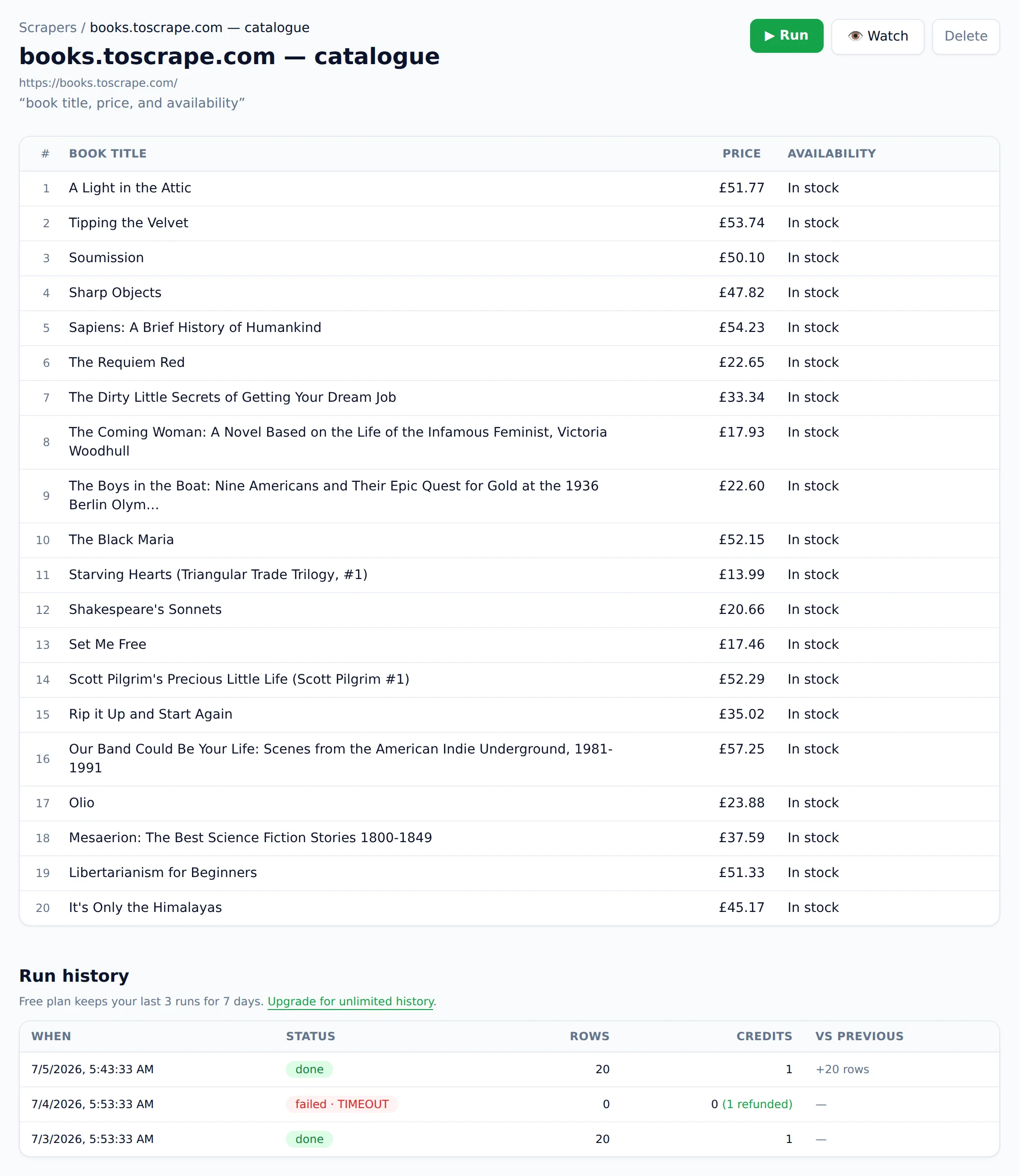
Thunderbit's extension model has a documented constraint: one scrape actively runs in the foreground at a time, and interactive scraping needs your browser open. Website Scraper runs on our servers. Paste a URL from any device and the job executes whether your laptop is open or not; bulk jobs, saved scrapers, and monitors all live server-side. If a page pushes back, the fetcher automatically tries harder, and menus, ads, and cookie banners are stripped before extraction — the table holds data, not webpage junk.
A price you can compute before you click
With row-based credits, you learn what a scrape cost after it finishes. A page might yield 40 rows or 400, and subpage fields double the rate. With Website Scraper, 1 credit = 1 page, full stop: you price a job by counting URLs. Then the receipt-grade guarantees — failed scrapes are refunded automatically, monthly prices are the real prices (no "billed annually" fine print; Thunderbit's $9 Starter is $15 month-to-month, and its Pro is $38), credit packs ($9 → 300, $29 → 1,200) never expire, and cancelled accounts keep data exportable for 30 days.
Monitoring that filters, not just re-scrapes
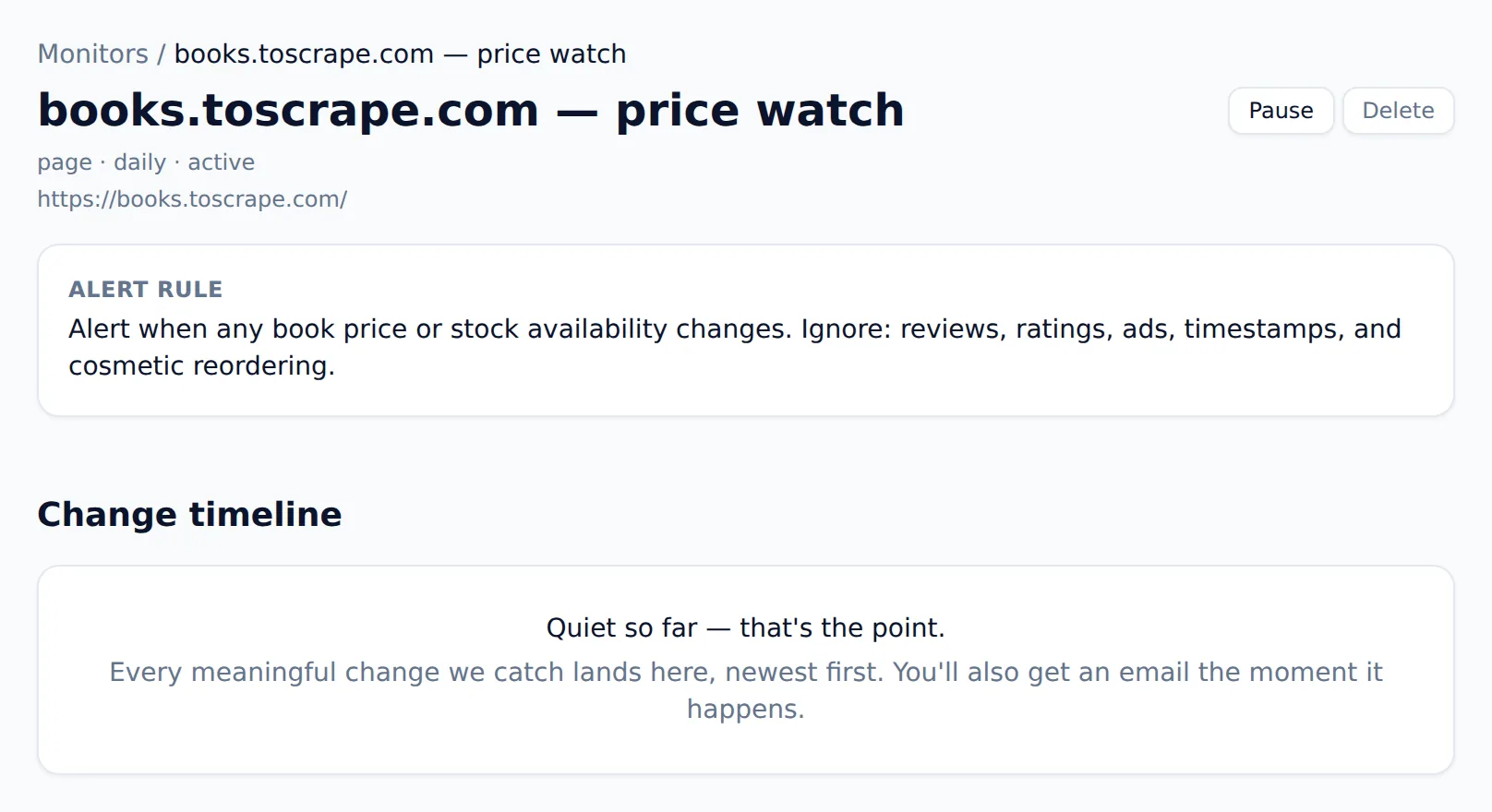
Thunderbit's scheduled scrapers re-run on a timer and deliver a fresh dataset; spotting what changed is your job. Website Scraper's monitors compare runs and weigh every change against the alert rule you wrote — a price moved, stock flipped, a listing appeared — and only a match alerts you, with a note on why. Rotating banners, view counters, reshuffled markup: silence. Daily checks on Starter ($19), hourly on Pro ($49), every 15 minutes on Business ($129), unlimited monitors on Scale ($299).
API and webhooks in the plan, not beside it
Thunderbit positions its Web Scraper API as a separate developer offering. Website Scraper includes the REST API and outbound webhooks from Pro ($49/mo) up, so piping monitor results into Slack, a database, or an internal tool doesn't mean buying a second product.
A free tier that recurs — and a demo that needs no signup
Website Scraper's free plan grants 25 credits every month with no card, enough to keep a small monitor running indefinitely. Thunderbit's free allowance is a small one-time page budget (check their pricing page for the current number). And before any of that: the homepage is the product. Paste a URL and run your first scrape logged out. The fastest way to learn whether the extraction handles your pages is to not create an account at all.
How do I switch from Thunderbit to Website Scraper?
Migration is re-describing, not rebuilding, and the free tier covers the validation run.
- Export your Thunderbit data to Excel, CSV, or Sheets so historical results travel with you.
- Inventory your scrapers: for each, note the URL(s) and the columns AI Suggest Fields produced.
- Recreate them as saved scrapers: paste the URL into Website Scraper and describe the columns ("product name, price, availability, review count"). The AI builds the table; there's no field-mapping UI to work through.
- Turn scheduled scrapers into monitors. Instead of only picking a frequency, describe what a meaningful change looks like, so alerts stay quiet the rest of the time.
- Wire up delivery. Replace manual re-exports with CSV/JSON/XLSX/Markdown downloads, or use the REST API and webhooks (Pro and up) for automation.
- Run in parallel briefly. The free tier's 25 monthly credits validate most setups. Keep Thunderbit for behind-login pages if you have them — the tools coexist fine.
Frequently asked questions
What is the main difference between Website Scraper and Thunderbit?
Thunderbit is a Chrome extension: it scrapes through your browser with AI-suggested fields and charges roughly one credit per output row. Website Scraper is a cloud web app: paste a URL, describe the data, and extraction runs server-side. Nothing to install, and one credit always equals one page.
Is Website Scraper's pricing simpler than Thunderbit's?
Yes, by design. Thunderbit bills per output row, subpage rows cost double, and its headline prices require annual billing. Website Scraper charges one credit per page regardless of row count, refunds failed scrapes automatically, posts monthly prices that are the real prices, and sells one-time credit packs that never expire.
Can Website Scraper monitor websites for changes like Thunderbit's scheduled scrapers?
Yes, with one important difference. Thunderbit's scheduled scrapers re-run on a timer and hand you fresh data to diff yourself. Website Scraper's monitors compare runs and read every change against the alert rule you wrote — a price drop or a new listing alerts you; a cosmetic page tweak never does.
Do I need to install anything to use Website Scraper?
No. It's a web app that runs in the cloud. There's no extension, no browser that has to stay open, and no per-device setup — you can even run your first scrape from the homepage without an account. Results export as CSV, JSON, XLSX, or Markdown, or flow out through the API and webhooks.
The bottom line
Thunderbit is arguably the best quick-grab scraping extension you can put in Chrome. If your work is browsing and extracting — behind logins, straight into Notion or Airtable — keep it, and I mean that. I built Website Scraper for the other job: scraping as infrastructure. A price you can compute before the job runs, monitors that only speak when something meaningful changes, API and webhooks in the box, failures refunded, packs that never expire.
Run your first scrape from the homepage without an account, then compare full plans on the pricing page. Recreating your first Thunderbit scraper takes about a minute: paste the URL, describe the columns, done. Weighing more options than these two? My roundup of the best AI web scrapers puts seven tools through the same credit-math scrutiny.