How to Scrape a Webpage: 3 Methods Compared
By Ashesh DhakalUpdated 8 min read
You need the data from one specific webpage in a spreadsheet — a table of prices, a list of products, a directory page. Not a whole-site crawl, not a data pipeline. One page, structured, now. There are three real ways to do it, and they differ mostly in how fast you get your first rows. The quickest is pasting the URL into a tool that can scrape any website and downloading the CSV; the most flexible is a short Python script; and for a plain HTML table, your spreadsheet app can sometimes do it alone. I tested all three for this post. The code and outputs below are real runs, not illustrative pseudocode.
(If your job is actually many pages or an entire site, see How to Scrape Data from Any Website — this article stays deliberately single-page.)
What are the 3 ways to scrape a single webpage?
A no-code AI webpage scraper (paste the URL, get a table), a short Python script with requests and BeautifulSoup, or in-browser methods — spreadsheet import functions and copy-paste — for simple visible tables. The right choice depends on the page's structure and whether you'll ever repeat the job.
Here's the comparison, including the number that matters most when you just need one page done:
| Method | Time to first data | Coding | JS-rendered pages | Repeatable later | Best for |
|---|---|---|---|---|---|
| AI webpage scraper | ~1 minute | No | Yes | Yes — saved + monitorable | Any page, any structure |
| Python + BeautifulSoup | ~15–30 min (first time) | Yes | No (needs Playwright) | Yes — it's a script | Devs; pages you'll re-scrape in a pipeline |
| Spreadsheet import / copy-paste | ~2–10 min | No | Mostly no | Fragile | One clean <table> on a static page |
"Time to first data" assumes you're starting cold. If you already have Python installed and a scraper template on disk, the script path drops to a few minutes — which is exactly why developers keep using it.
All the examples below run against https://books.toscrape.com/, a public sandbox site built for scraping practice, so you can follow along with zero legal or rate-limit anxiety. I ran every snippet exactly as shown; the outputs are what came back.
How do I scrape a webpage without writing code?
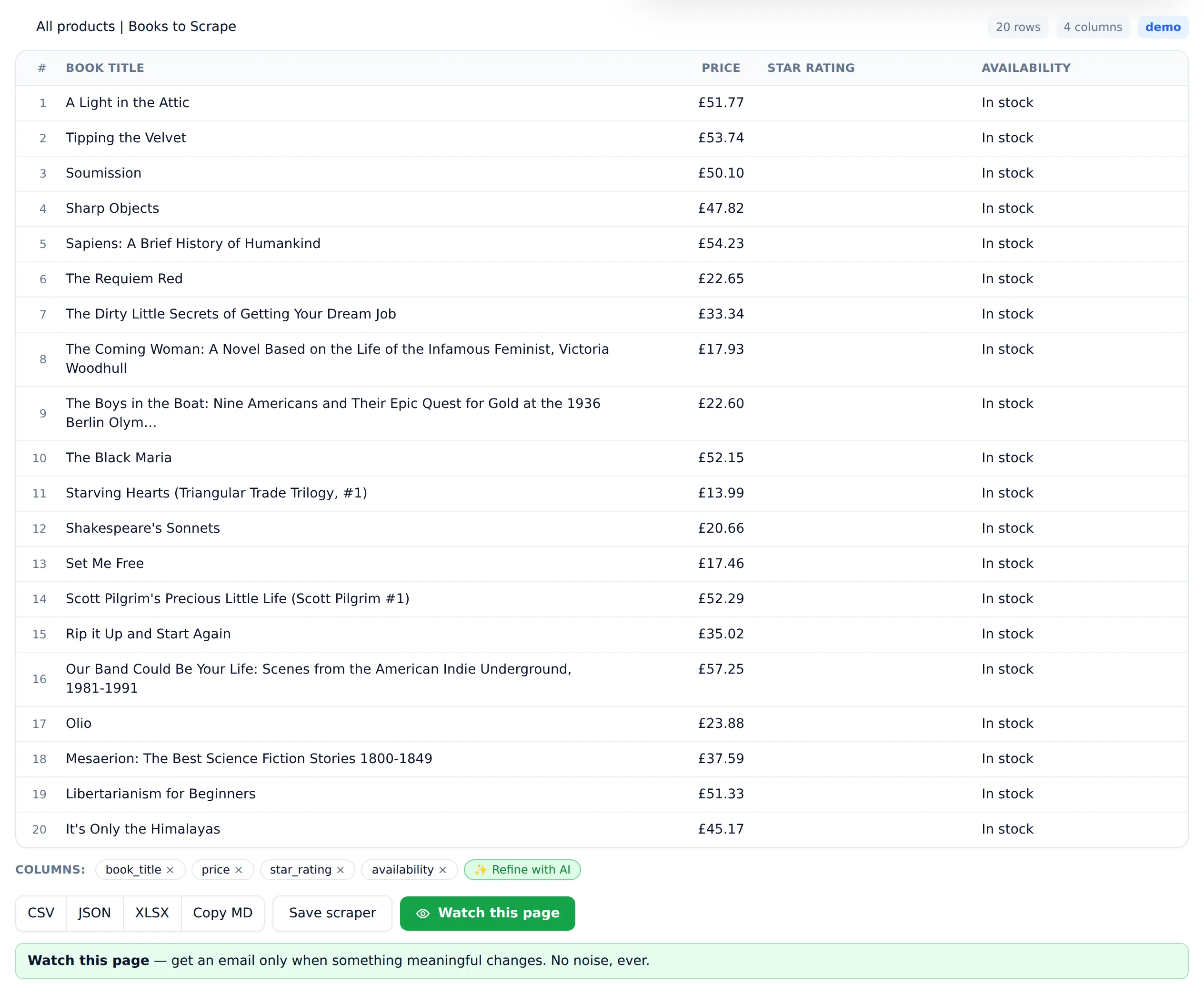
Paste the page URL into an AI webpage scraper, wait a few seconds while it renders the page and detects the repeating records, then review the table and download the CSV. No install, no selectors, no configuration — and the result can be saved and monitored for changes instead of re-scraped by hand.
The flow in Website Scraper:
- Paste the URL on the homepage — for practice,
https://books.toscrape.com/. - Wait for detection. The page loads in a headless browser (so JavaScript-built content is included) and the AI identifies the repeating items and their fields — for the bookstore, each book's title, price, rating, and stock status.
- Review the columns. Drop what you don't need, ask for anything it missed.
- Download the CSV, or save the scrape. A saved page can be monitored, and the alert fires when its data meaningfully changes — not on every trivial diff.
One page costs one credit; the free tier includes 25 credits a month, and failed scrapes are never charged, so a stubborn page costs nothing to attempt.
The honest limits — and I say this as the person who builds the tool: it extracts what the page shows. Pages behind logins, multi-step interactions, or extractions needing custom logic ("only rows where X, joined against my database") push you toward the Python method below.
How do I scrape a webpage with Python?
Install requests and beautifulsoup4, fetch the page, parse it with a CSS selector for the repeating element, and write the rows out with the csv module. For a static page the whole program is about twenty lines, and it's rerunnable forever. Here is a complete script, run before publishing.
Setup (once):
pip install requests beautifulsoup4
The full single-page scraper — I ran this exact code before publishing:
import csv

import requests
from bs4 import BeautifulSoup

URL = "https://books.toscrape.com/"

response = requests.get(URL, headers={"User-Agent": "Mozilla/5.0"}, timeout=10)
response.raise_for_status()
response.encoding = "utf-8"

soup = BeautifulSoup(response.text, "html.parser")

rows = []
for card in soup.select("article.product_pod"):
    rows.append({
        "title": card.h3.a["title"],
        "price": card.select_one("p.price_color").get_text(),
    })

with open("page.csv", "w", newline="", encoding="utf-8") as f:
    writer = csv.DictWriter(f, fieldnames=["title", "price"])
    writer.writeheader()
    writer.writerows(rows)

print(f"Saved {len(rows)} rows to page.csv")
Output:
Saved 20 rows to page.csv
And the file it produced:
title,price
A Light in the Attic,£51.77
Tipping the Velvet,£53.74
To adapt this to your page, only two things change: the URL, and the selectors. Right-click the data in your browser, choose Inspect, and find (a) the element that wraps each repeating item — that replaces article.product_pod — and (b) the elements inside it holding each field, which replace the inner selectors.
Some pages aren't lists but a single record — a product page, a profile, a spec sheet. Same technique, no loop. This snippet scrapes one book's detail page, reading its spec table into a dictionary (also a real run):
import requests
from bs4 import BeautifulSoup

url = "https://books.toscrape.com/catalogue/a-light-in-the-attic_1000/index.html"
response = requests.get(url, timeout=10)
response.encoding = "utf-8"
soup = BeautifulSoup(response.text, "html.parser")

data = {"title": soup.select_one("div.product_main h1").get_text()}
for row in soup.select("table.table-striped tr"):
    data[row.th.get_text()] = row.td.get_text()

for key in ("title", "UPC", "Price (incl. tax)", "Availability"):
    print(f"{key}: {data[key]}")
Output:
title: A Light in the Attic
UPC: a897fe39b1053632
Price (incl. tax): £51.77
Availability: In stock (22 available)
Three gotchas account for most first-script failures:
- Garbled characters (
£instead of£): the server didn't declare its charset. Theresponse.encoding = "utf-8"line fixes it — I hit this exact bug on this exact site, which is why the line is in both scripts. AttributeError: 'NoneType' object has no attribute 'get_text': your selector matched nothing. Re-inspect the element; class names rarely survive site redesigns.- Empty results on a page that clearly shows data: the content is rendered by JavaScript, and
requestsonly sees the pre-JavaScript HTML. View the page source (Ctrl+U) — if your data isn't in there, this script can't reach it. You need Playwright, or a scraper that renders pages for you.
For pagination, error handling, and a full-catalog crawl, the complete Python web scraping tutorial continues from exactly this point.
Can I scrape a webpage with just my browser or spreadsheet?
Sometimes. If the data lives in a real HTML <table> on a static page, Google Sheets' IMPORTHTML function or Excel's Data > From Web can pull it in without any other tool. And for genuinely tiny jobs, select-copy-paste still works. Both collapse quickly outside that narrow case.
In Google Sheets, this formula imports the first table from a page:
=IMPORTHTML("https://example.com/page", "table", 1)
Excel's equivalent lives under Data → Get Data → From Web, which detects tables on the URL you give it.
The catch is that qualifier — a real HTML table. Modern pages mostly aren't built from <table> tags; they're repeating <div> and <article> cards styled to look tabular, which IMPORTHTML can't see as a table at all. The demo bookstore's product grid is exactly this: card-based markup, invisible to table importers, handled without fuss by either method above.
When does a webpage scraper beat manual copy-paste?
Copy-paste wins for one small, well-formatted table you'll never need again. A webpage scraper wins the moment any of these is true: the page has more than a screenful of items, the layout mangles on paste, the data repeats as cards rather than table rows, or you'll want the same data again later.
The failure modes of copy-paste are familiar to anyone who's tried it:
- Merged and misaligned columns. Prices land in the name column; a hidden
<span>splits one field across three cells. You spend longer repairing the paste than a scraper would have taken end to end. - Invisible cruft. "Add to cart" button labels, screen-reader text, and icon glyphs come along for the ride and need deleting from every row by hand.
- No repeatability. Next week's version of the page means redoing the whole job. A scrape — script or saved tool run — is one click. And if the page matters enough to check repeatedly, monitoring it for changes automatically beats both.
- Scale. Twenty items is a chore. Two hundred is an evening. Scrapers don't care about the difference.
My rule of thumb: if you'll spend more than five minutes copying and cleaning, or you'll ever need the data a second time, scrape it instead.
Which method should you actually use?
Match the method to the page and to the future of the data. One clean HTML table, needed once: try a spreadsheet import first — or scrape it straight to Excel if the import comes back empty. Any other structure, needed fast, no code: an AI webpage scraper. A page you'll re-scrape inside scripts, pipelines, or with custom logic: the Python route.
A reasonable default order costs you almost nothing. Spend one minute pasting the URL into the free web scraper — 25 pages a month are free, no card, and a failed attempt isn't charged. If the table comes back right, you're finished. If the job reveals itself to be bigger — many pages, custom logic, pipeline integration — you've lost a minute and learned the page's structure, and the Python tutorial or the full method comparison picks up from there. One page of data should never take an afternoon.