AI Website ScraperPaste a URL, get a clean table in seconds
Describe the data you want in plain English and get consistent, typed columns back. No code, no selectors, nothing breaks when sites change.
- AI-powered extraction
- No signup for your first scrape
- No credit card
- Failed scrapes never charged
How do you scrape a website without coding?
Three steps, under a minute, nothing to install. Everything runs in the cloud, and the parts that used to need Python scripts or robot training are handled by AI.
Paste a URL
Any public page: a product category, a directory, a jobs board, an article index. Whole sites and 100-URL batches work too, with a page-count preview before anything is charged.
Describe the data (or don't)
Type “product name, price, and rating” or leave it blank and the AI finds the main repeating data itself. It reads the fully rendered page the way you would, then builds sensible, consistently-typed columns.
Export it, or watch it
Download CSV, Excel, or JSON, copy as Markdown, or pull it through the REST API. One more click turns the scrape into a monitor that emails you only when something meaningful changes.
Real output · books.toscrape.com, default prompt
Completed in about twelve seconds
| # | book title | price | availability |
|---|---|---|---|
| 1 | A Light in the Attic | £51.77 | In stock |
| 2 | Tipping the Velvet | £53.74 | In stock |
| 3 | Soumission | £50.10 | In stock |
| 4 | Sharp Objects | £47.82 | In stock |
| 5 | Sapiens: A Brief History of Humankind | £54.23 | In stock |
| 6 | The Requiem Red | £22.65 | In stock |
Twenty rows came back in about twelve seconds; six are shown here. Try the same scrape yourself with the “try an example” link above — it's free.
Popular use cases
What can an AI web scraper extract?
If information repeats on a page, it can be rows in a table. These are the jobs people bring to Website Scraper every day:
Price & stock tracking
Pull product names, prices, and availability from category pages into one table — then watch them and get an email only when a price actually moves.
Lead and contact lists
Turn directories, member pages, and exhibitor lists into clean spreadsheets with consistent columns instead of an evening of copy-paste.
Job listings
Collect roles, salaries, and locations from career pages and job boards. Monitor them to catch new postings the hour they appear.
Real-estate listings
Extract addresses, prices, beds, and square footage from listing pages into a table you can sort, filter, and export to Excel.
Research datasets
Rankings, statistics, event calendars, species lists — if it's laid out as repeating information on a page, it can be rows in your dataset.
Competitor monitoring
Watch a competitor's pricing page or changelog and get one clear email when a tier, price, or headline feature changes. Reviews and blog noise ignored.
Export CSV, Excel, JSON, or Markdown, or pull clean rows through the REST API.
Start with a URLMonitor websites for changes. Get alerted only when it matters
Most change-detection tools diff the raw page and cry wolf: a rotated ad, a new timestamp, a reshuffled review, and there's another email. Website Scraper works differently. You write the alert rule in your own words — “prices or stock; ignore reviews” — and every detected change is read against that rule before anything is sent. Only matches reach your inbox, each with the reason it mattered spelled out.
- Watch one page, a whole site section, or the entire web for a topic
- Daily, hourly, or 15-minute schedules — checks run in the cloud, not your browser
- Every meaningful change lands in a timeline you can scroll back through
- Alerts are signed and automatically retried, so a blip never means a missed change
Want the full picture? See how to monitor a website for changes — every watch scope, schedule, and alert-rule example.
Why AI extraction instead of CSS selectors?
Traditional scrapers (browser extensions, point-and-click robots, hand-written scripts) memorize where data lives in a page's HTML. The day the site ships a redesign, those selectors point at nothing, and your scraper silently returns garbage until someone notices and re-trains it. AI extraction reads the rendered page the way a person does and understands what the data is, so a moved price is still a price. Pages are fully rendered first, including JavaScript apps, infinite scroll, and late-loading content, and menus, ads, and cookie banners are stripped before extraction, so your table contains what you asked for and nothing else. Every scrape can include a screenshot, so you can verify exactly what the scraper saw. And when a scrape does fail, you're refunded automatically. You pay for data, not attempts.
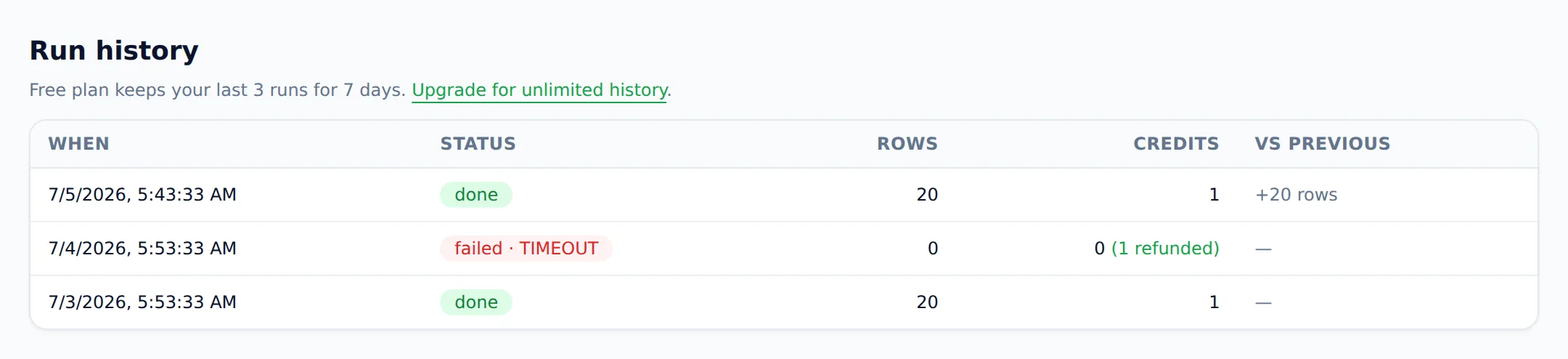
Export to Excel, CSV, or JSON. Or pull rows from the web scraper API
Every result exports as CSV, Excel (XLSX), or JSON, or copies straight to your clipboard as a Markdown table — a spreadsheet is the most common ask, so here's how to scrape a website to Excel. On Pro plans, saved scrapers push run results to your systems with signed webhooks, and the REST API returns structured rows from one request:
curl https://websitescraper.io/api/v1/scrape \
  -H "Authorization: Bearer ws_live_..." \
  -d '{"url": "https://books.toscrape.com/",
       "prompt": "book name and price"}'

# → {"columns": ["book_name","price"], "rows": [...], "row_count": 20}
Simple pricing: one credit, one page
No seats, no row limits, no annual lock-in hiding behind a toggle. One credit scrapes one page; failed scrapes are refunded automatically.
Free
$0
25 credits/mo · 1 daily monitor · no card
Starter
$19/mo
1,000 credits · 5 monitors
Pro
$49/mo
5,000 credits · 25 monitors · API
Business
$129/mo
25,000 credits · 100 monitors · API
Scale
$299/mo
100,000 credits · unlimited monitors · API
One-off job? Credit packs — $9 for 300, $29 for 1,200 — never expire. Full details on the pricing page.
How does Website Scraper compare to Browse AI, Octoparse, and Thunderbit?
Honestly: they're capable tools, and for some jobs they're the right pick — the detailed comparisons below say so. The short version:
| Website Scraper | Browse AI | Octoparse | Thunderbit | |
|---|---|---|---|---|
| Setup | Paste a URL | Train a robot | Build a workflow | Chrome extension |
| Try without signup | Yes — above | No | No | No |
| Pricing visible | On this page | Hidden | Hidden | Partially |
| Change alerts | Rule-filtered, no noise | Diff-based | — | Basic |
| Failed scrapes | Auto-refunded | Counted | Counted | Counted |
Full, fair write-ups: vs Browse AI, vs Thunderbit, and vs webscraper.io, or the full round-up of the best AI web scrapers. We also put one AI scraper through a real test across 13 popular sites — 10 scraped cleanly, 3 blocked.
Who's behind Website Scraper?
Website Scraper is built by Ashesh Dhakal, a full-stack developer who also built SVG AI — an AI SVG generator with 65,000+ registered users — and ImageToVid. The same conviction runs through this product: AI tools should do the tedious part end-to-end, show their work, and bill like a receipt. Scraping here is also respectful by design — robots.txt is honored, and banking, government, and people-search sites are refused outright.
Frequently asked questions
- Is there a free AI web scraper?
- Yes — Website Scraper is a free AI web scraper on its free plan: 25 page credits every month with no credit card, and your very first scrape works right on this page without an account. It's a working tier, not a trial: credits refresh monthly, exports are included, and failed scrapes are never charged.
- Can AI scrape websites?
- Yes. An AI web scraper reads a page's rendered content the way a person does and returns structured data — no CSS selectors, no code. Paste a URL, optionally describe the fields you want, and the AI builds a clean table in seconds. It keeps working even after a site changes its layout.
- How do I scrape data from a website without coding?
- Paste the page's URL into a no-code web scraper, describe the data you want in plain English (or let the AI detect the main table automatically), then export the result as CSV, Excel, or JSON. The whole path from URL to spreadsheet takes under a minute.
- Can I scrape sites that use JavaScript?
- Yes. Pages are fully rendered — including React and Vue apps, infinite scroll, and content that loads late — before extraction begins. If a site pushes back, the fetcher automatically retries with heavier-duty settings. You see the data, not the fight.
- Can I schedule a scrape to run automatically?
- Yes. Any scrape can become a monitor that re-checks the page daily, hourly, or every 15 minutes depending on your plan. Checks run in the cloud, so nothing needs to stay open on your computer, and results accumulate into a change history you can scroll back through. Repeat scrapes of recently fetched pages also come back near-instantly, so manual re-runs are quick too.
- How do change alerts work?
- You write an alert rule in your own words — 'prices or stock, ignore reviews' — and every change we detect is read against that rule before anything is sent. Only changes that match it earn an email, each with the reason attached. Timestamps, rotating ads, and cosmetic edits never reach your inbox.
- Is web scraping legal?
- Scraping publicly available data is generally lawful in most jurisdictions, but you should respect each site's terms of service and robots.txt, avoid personal data covered by privacy laws like GDPR and CCPA, and never scrape behind logins you don't own. This is general information, not legal advice.
- How is Website Scraper different from Octoparse or Browse AI?
- Three ways: you can try it without signing up, pricing is public and per-page (failed scrapes refunded, packs never expire), and monitoring alerts pass through an alert rule you write yourself, so you're only emailed about changes that actually match it. Tools built on recorded robots or point-and-click selectors need re-training whenever a site changes; AI extraction doesn't.
- What does it cost?
- One credit scrapes one page — that's the whole model. Free: 25 credits monthly. Plans: $19 for 1,000 credits, $49 for 5,000 with hourly monitoring and API access, up to $299 for 100,000. One-time packs ($9 for 300, $29 for 1,200) never expire. Failed scrapes are always refunded.
- Which AI can scrape websites?
- General chatbots can read a page you paste, but they can't crawl reliably, render JavaScript-heavy sites, schedule checks, or export clean tables at scale. Purpose-built AI scraping tools like Website Scraper pair a real fetching engine with AI extraction, then add saving, monitoring, exports, and an API — which also makes it a scraping backend for AI agents that need structured rows from a URL.
Still deciding? Scrape a page at the top of this screen — it's free and takes seconds. Or read how to scrape data from a website and web scraping without code for the deeper walkthroughs.