Price & stock tracking
Price Scraper: Pull Prices Into a Table, Then Watch Them
A free price scraping tool that turns any store page into a clean, sortable table of products and prices — no code, no selectors, nothing to install. Then save it as a monitor and get one email only when a price actually moves. The box below is already loaded with a price page, so you can run it now.
- Prices as sortable numbers
- No signup for your first scrape
- No credit card
- Failed scrapes are never charged
What does a price scraper do?
A price scraper reads a store or catalog page and turns its products and prices into a clean table you can sort, export, or track — instead of copying prices into a spreadsheet by hand. You paste a URL, and within seconds you have typed rows: product name, price, availability, and anything else the page lists. Because the extraction is done by AI reading the rendered page rather than by hand-written selectors, a redesign that moves the price around doesn't break anything — a price is still recognized as a price wherever it lands.
That's the scraping half. The other half is why most people are here: prices don't sit still. A one-time table is useful, but a table that watches itself and pings you the moment a competitor drops a price is a different thing entirely. This page does both — and the section below shows exactly what a real run returns.
Real output — books.toscrape.com, scraped with the default prompt
20 products · tested October 7, 2026
| # | book title | price | availability |
|---|---|---|---|
| 1 | A Light in the Attic | £51.77 | In stock |
| 2 | Tipping the Velvet | £53.74 | In stock |
| 3 | Soumission | £50.10 | In stock |
| 4 | Sharp Objects | £47.82 | In stock |
| 5 | Sapiens: A Brief History of Humankind | £54.23 | In stock |
| 6 | The Requiem Red | £22.65 | In stock |
| 7 | The Dirty Little Secrets of Getting Your Dream Job | £33.34 | In stock |
| 8 | The Coming Woman: A Novel Based on the Life of the Infamous Feminist, Victoria Woodhull | £17.93 | In stock |
A real run against books.toscrape.com, a public demo bookstore. On October 7, 2026, a fresh extraction returned twenty products with the requested title, displayed price and availability columns; the first eight are shown. Download the actual files below, or try your own source in the tool above.
Comparing approaches first? See our price scraping tools comparison. Ready to analyze the table? Follow the website-to-Excel workflow.
How does price scraping work?
Three steps, under a minute, nothing to install — everything runs in the cloud. The parts that used to need Python and a scheduler are handled for you.
Paste the store URL
Any public product listing: a category page, a search-results page, a deals grid, a single product page. Whole catalogs and 100-URL batches work too, with a page-count preview before you're charged a single credit.
Name the price columns — or don't
Name the fields you need, such as product name, displayed price and availability. Review the currency and value format before calculating: displayed price text is preserved rather than silently converted.
Export the table — or watch it
Download CSV, Excel, or JSON, or copy the table as Markdown. One more click turns the scrape into a monitor that emails you only when a price actually changes — the difference between a spreadsheet and a price-tracking system.
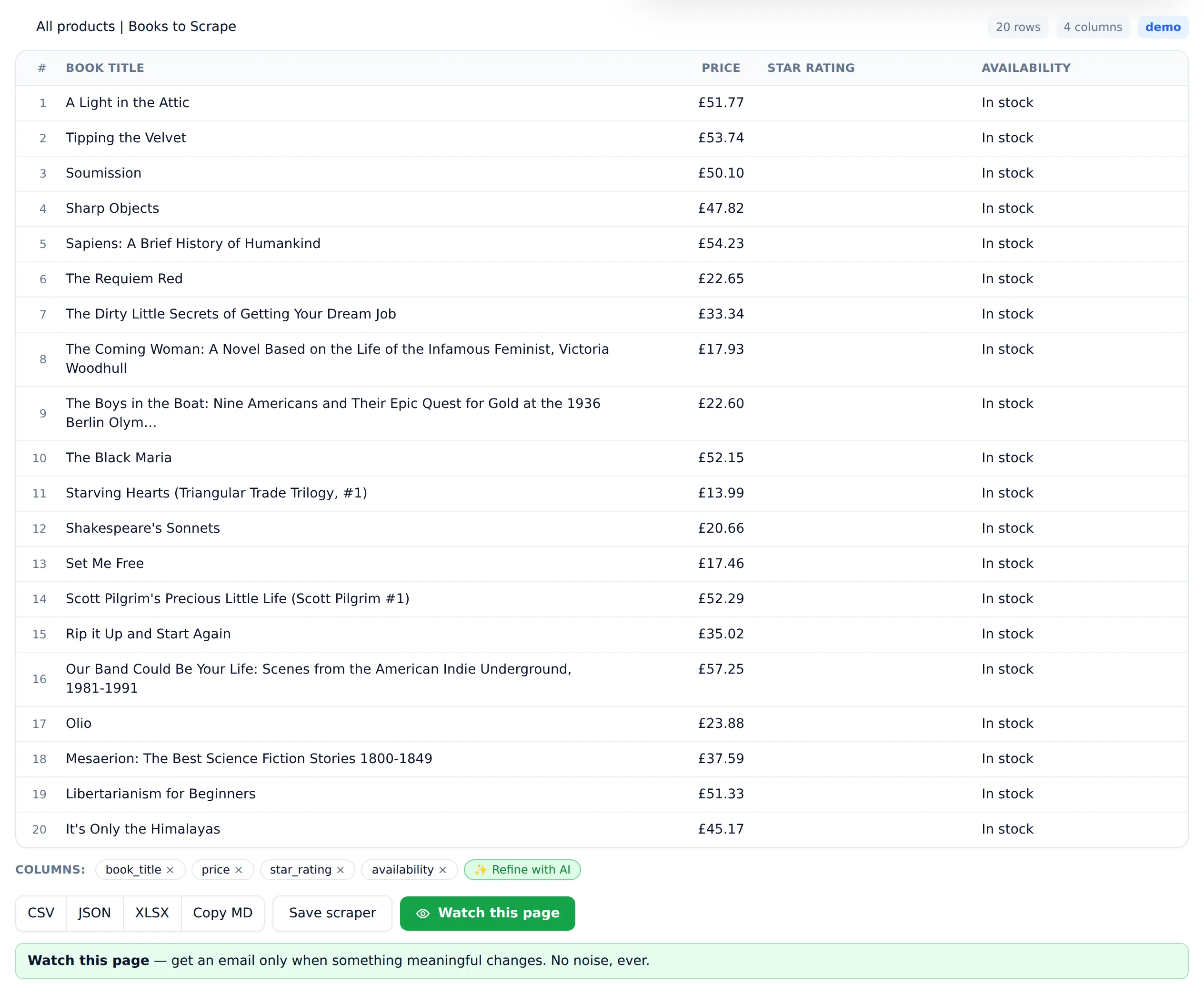
A couple of details matter once you do this often. Repeat scrapes of a page you fetched recently come back near-instantly, so re-running a check is quick. And you never fight the page: menus, ads, and cookie banners are stripped before extraction, JavaScript storefronts are fully rendered first, and if a scrape fails you're refunded automatically — you pay for prices you got, not attempts. If you want the deeper walkthrough, the guide on how to scrape data from a website covers the general workflow, and the AI website scraper on the homepage is the same tool for any kind of page.
Price tracking software: watch competitor prices automatically
Scraping a price page once tells you today's prices. Price tracking tells you when they change — and that's the job most people actually have. You're watching a competitor's catalog to react when they undercut you, watching a supplier to catch a restock, or watching your own listings across marketplaces to spot a rogue discount. Doing that by re-scraping and eyeballing a spreadsheet every morning is exactly the chore worth automating.
So the price scrape doesn't stop at the table. Any scrape can become a monitor: we re-check the page on a schedule and compare it to the last version. The trick is what counts as a change worth an email — and that's where an alert rule comes in. Price tracking is one job for it; the same engine can monitor any website for changes — a changelog, a policy page, a job board.
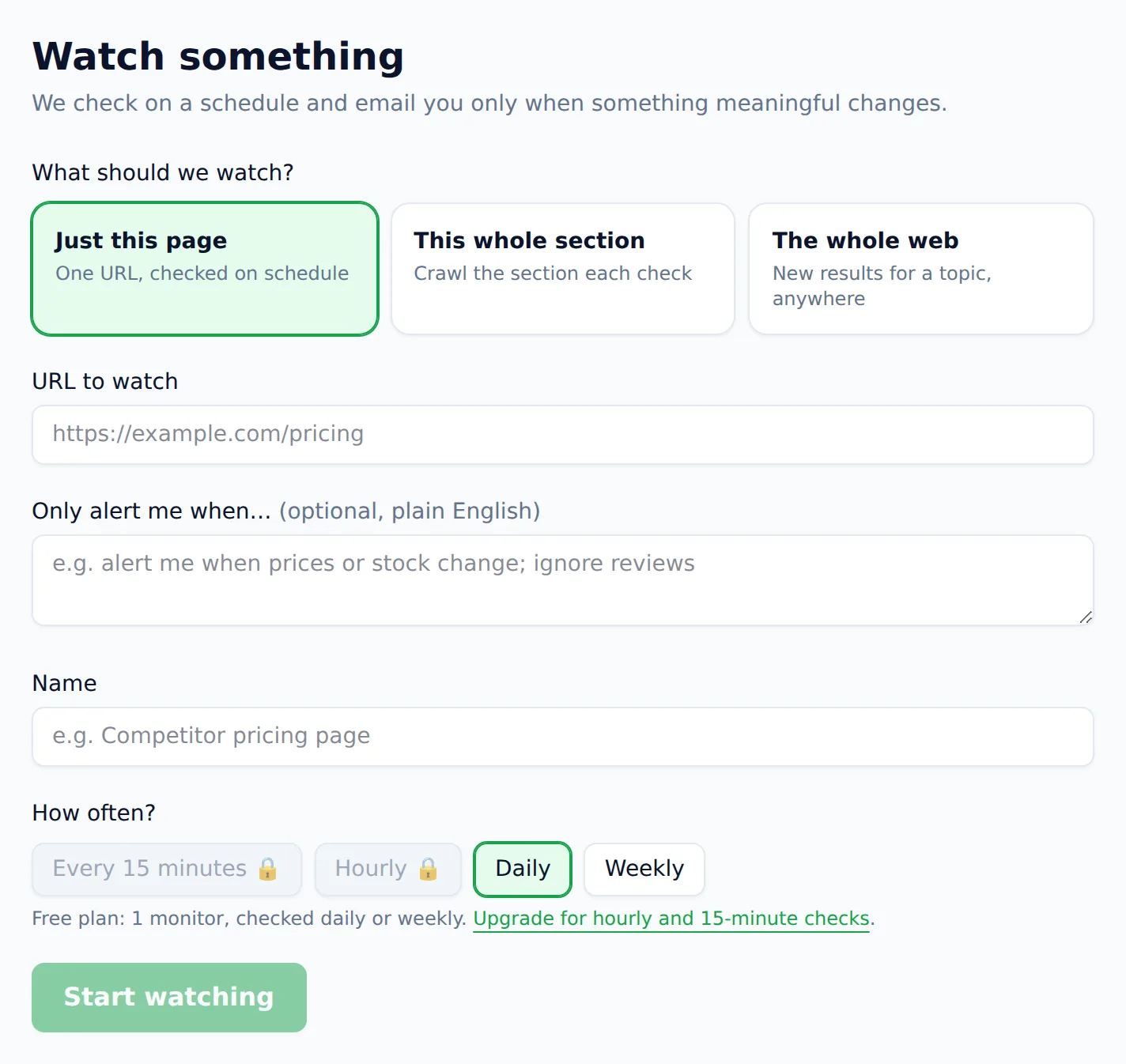
Turn a price scrape into a monitor — and get alerted only when a price moves
Most change-detection tools diff the raw page and cry wolf: a rotated ad, a new timestamp, a reshuffled review, and there's another email. Website Scraper works differently. You write the alert rule in your own words — “alert me when any price drops; ignore reviews and stock counts” — and every change we detect is read against that rule before anything is sent. Only matches reach your inbox, each with the reason it mattered spelled out.
- Save any price scrape as a monitor in one click — the table you already trust becomes the baseline
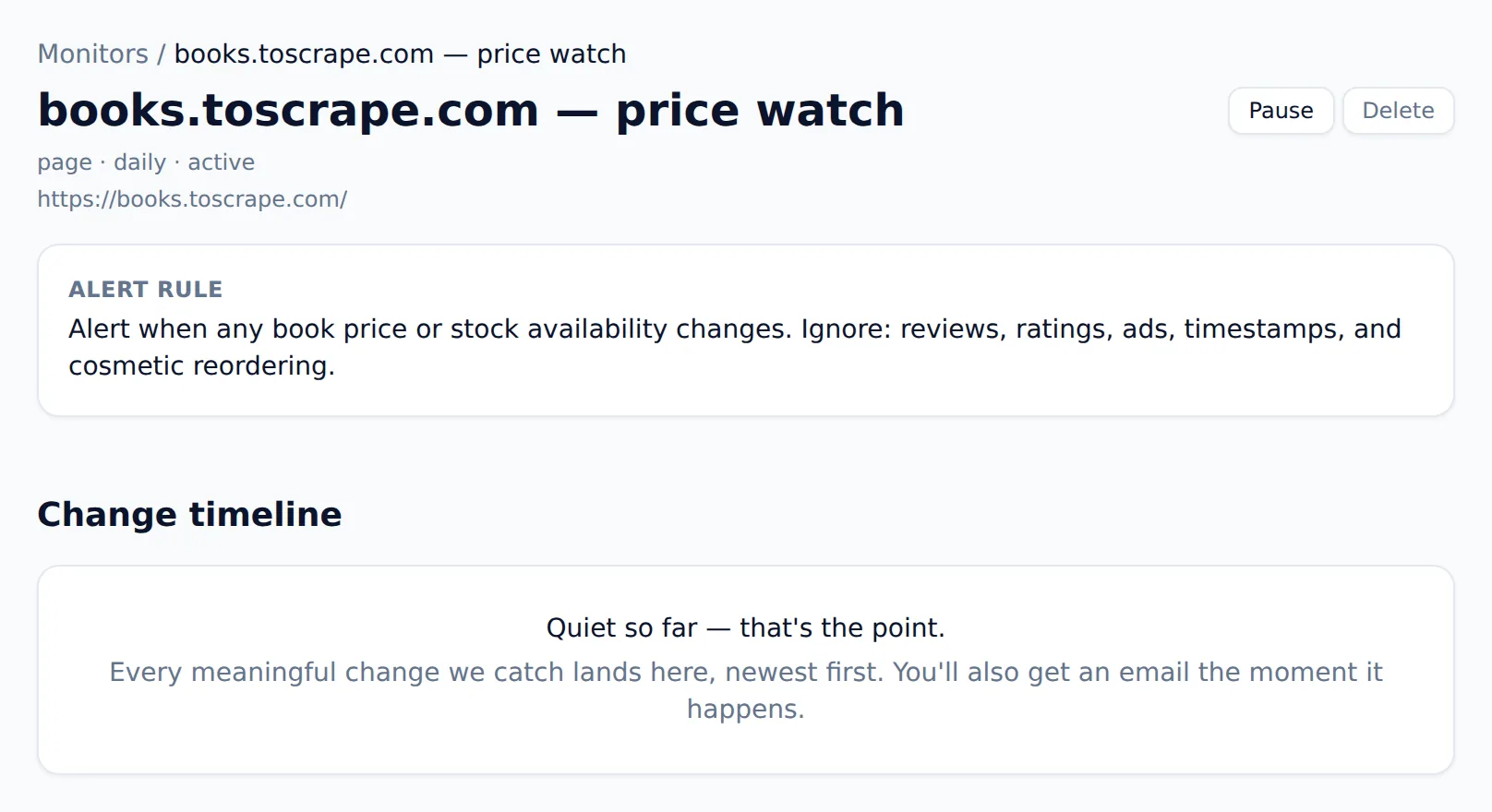
- Write the alert rule in plain English; it decides what earns an email, so timestamps and cosmetic edits stay silent
- Daily, hourly, or 15-minute checks run in the cloud, not your browser
- Every price change lands in a timeline you can scroll back through, newest first
- Alerts are signed and automatically retried, so a blip never means a missed price drop
Is it legal to scrape prices from a website?
Scraping publicly listed prices generally sits on firmer legal ground than most kinds of scraping, because a price is a fact rather than a creative work, and courts have repeatedly treated publicly accessible data differently from content behind a login. That's a starting point, not a blank cheque. Respect each site's terms of service and robots.txt, keep your request rate polite, steer clear of personal data covered by privacy laws like GDPR and CCPA, and never scrape behind a login you don't own. Website Scraper is built to make the responsible path the default: robots.txt is honored, and sensitive categories like banking, government, and people-search are refused outright.
For a fuller treatment of where the lines are, see whether web scraping is legal in depth. This page is general information, not legal advice — if the stakes are high, talk to a lawyer about your specific use.
What does a price scraping tool cost?
One credit scrapes one page — a category page of products is a single credit, whatever the row count. The free plan gives you 25 credits a month and one daily monitor with no credit card, which covers evaluation and small recurring jobs. Beyond that, plans start at $19/month for 1,000 pages, and $49/month adds hourly monitoring and API access. One-time credit packs — $9 for 300, $29 for 1,200 — never expire, and failed scrapes are always refunded. The full pricing page lays out every tier and the credit-pack details. Weighing this against other options? The comparison of price scraping tools covers the five kinds on the market and which job each one wins.
Price scraper FAQ
- How much does a price scraper cost?
- Website Scraper is free to start: 25 page credits every month, no credit card, and your first scrape runs on this page without an account. One credit scrapes one page — a category page of products is one page. Paid plans start at $19/month for 1,000 pages, and one-time credit packs ($9 for 300, $29 for 1,200) never expire. Failed scrapes are refunded automatically, so you only pay for pages that return data.
- Can I track competitor prices with it?
- Yes. Try the public category or product page first, then save a monitor with an alert rule such as "alert me when a price drops." Scheduled checks use that rule to filter unrelated changes. Review early alerts against the source to make sure the rule fits your task.
- Does it work on JavaScript-heavy store pages?
- Yes. Pages are fully rendered — including React and Vue storefronts, infinite scroll, and prices that load late — before extraction begins. If a site pushes back, the fetcher automatically retries with heavier-duty settings. You get the price table, not a page of loading spinners.
- How often can it check a page for price changes?
- Daily on the free and Starter plans, hourly on Pro, and every 15 minutes on Business. Checks run in the cloud, so nothing needs to stay open on your computer. Each check appends to a change timeline you can scroll back through, and only meaningful changes earn an email.
- Do I need to write code to scrape prices?
- No. Paste the URL and name the columns you want, such as product name, displayed price and availability. Review the returned table, then save the scraper to reuse those columns. A changed source layout can still affect the result, so check a few rows after major site changes.
- Is it legal to scrape prices from a website?
- Scraping publicly listed prices — which are facts, not creative works — generally sits on firm legal ground in most jurisdictions. You should still respect each site's terms of service and robots.txt, avoid personal data covered by laws like GDPR and CCPA, and never scrape behind a login you don't own. Website Scraper honors robots.txt and refuses sensitive categories. This is general information, not legal advice.
- What columns come back when I scrape a price page?
- Whatever the page lists as repeating data — typically product name, price, and availability, plus anything else you name in the prompt (rating, SKU, discount). You can drop a column you don't want or ask the AI to add one, then export the result as CSV, Excel, JSON, or Markdown.
- Can it scrape prices from more than one page at a time?
- Yes. Point it at a paginated catalog and each page is one credit, with a page-count preview before anything is charged. Whole site sections and 100-URL batches merge into a single table. For a recurring job, a monitor re-runs it on a schedule instead of you re-pasting URLs.
Comparing tools first? The round-up of the best AI web scrapers weighs the options on pricing honesty and maintenance burden, including for price-tracking work. Scraping a specific site? There are tuned pages for the eBay scraper, Best Buy scraper, and real estate scraper.
Try the price scraper now, then let it watch for you
Paste a store URL at the top of the page and run your first scrape free, no account needed. When the table looks right, one click turns it into a price monitor that only emails you when a price actually moves.