Browse AI Alternative: Website Scraper vs Browse AI
By Ashesh DhakalUpdated 9 min read
Nobody searches for a "Browse AI alternative" out of curiosity. Something specific pushed you here, and it's usually one of three mechanics of how the product works: robots trained on a page layout stop working when that layout changes, the $19/month headline price turns out to require annual billing ($48 if you pay monthly), or a stack of unused credits evaporates when the month resets. I built Website Scraper, which takes a different route to the same destination — paste a URL, describe the data you want in plain English, get a clean table — so read this page knowing the author has a horse in the race. I'll also tell you precisely when Browse AI is the better buy, because a comparison that never concedes anything is worthless to you.
I started Website Scraper because I kept wanting web data in spreadsheet form without operating an automation platform to get it. Browse AI is a real product with a deep integration surface, and for some teams it's the right one. This page covers where each tool wins, what both actually cost in 2026, and how to switch if the math says to.
What is Browse AI?
Browse AI is a no-code scraping and monitoring platform organized around trained robots. You record a task in your browser — clicking through a site, selecting the data you want — and a robot learns to repeat it on a schedule. Robots extract structured lists, watch pages for changes, and push results to Google Sheets, Airtable, Zapier, Make, webhooks, or a REST API.
It's mature. There's a library of prebuilt robots for popular sites, deep scraping that follows links into detail pages, and residential proxies on paid plans. Plans run from a free tier (50 credits/month, 2 websites) up to a Premium tier starting at $500/month for enterprise-scale monitoring, per Browse AI's pricing page. The credit model is row-based: one credit covers up to 10 rows extracted from a page, and "premium" sites cost 2–10 credits per run. If you want configurable, repeatable robots across many sites, the platform delivers that.
Website Scraper vs Browse AI: side-by-side comparison
I verified the Browse AI numbers below against their pricing page on July 4, 2026. Plans change, so confirm current figures there before deciding.
| Website Scraper | Browse AI | |
|---|---|---|
| Entry paid plan | Starter: $19/mo — 1,000 credits, 5 monitors, daily checks | Personal: $48/mo billed monthly, or $19/mo billed annually — 2,000 credits/mo, 5 websites |
| Mid tier | Pro: $49/mo — 5,000 credits, 25 monitors, hourly checks, API + webhooks | Professional: $87/mo monthly or $69/mo annually — from 5,000 credits/mo, 10 websites |
| High tier | Business: $129/mo — 25,000 credits, 100 monitors, 15-min checks; Scale: $299/mo — 100,000 credits, unlimited monitors | Premium: from $500/mo (billed annually), custom limits |
| Free tier | 25 credits/mo, no credit card | 50 credits/mo, 2 websites, no card |
| Credit model | 1 credit = 1 page; failed scrapes never charged; packs ($9→300, $29→1,200) never expire | 1 credit = up to 10 rows from a page; premium sites cost 2–10 credits/run; credits reset monthly |
| Extraction method | AI extraction: paste URL + plain-English description → table. No selectors, no training | Train a robot by recording your clicks; robot replays the task |
| Monitoring | Alert rules filter every change — only matches alert ("no noise"); daily / hourly / 15-min by plan | Scheduled change monitoring; hourly minimum on standard plans, faster on Premium |
| Exports | CSV, JSON, XLSX, Markdown | Google Sheets, Airtable, CSV, integrations |
| API & webhooks | REST API + outbound webhooks (Pro and up) | REST API + webhooks, Zapier, Make, Pabbly, Amazon S3 |
| Setup time | Under a minute: paste URL, describe data | Minutes per robot: record, verify, adjust |
A note on comparing credits fairly, because the models genuinely differ. Browse AI's row-based credit can be efficient on long list pages, where one credit covers up to 10 rows. Website Scraper's page-based credit is easier to predict: 1 page = 1 credit, whatever the row count. If your work is a few very long tables, row math can favor Browse AI. If it's many separate pages, detail-page monitoring, or anything a "premium site" multiplier touches, page-based pricing usually comes out cheaper — and always comes out more predictable.
When is Browse AI the better choice?
Keep Browse AI if you need multi-step browser automation, its prebuilt robot library, residential proxies, or native, continuously synced pushes into Google Sheets, Airtable, Zapier, and Make. Teams with a working fleet of trained robots, and enterprises that need Premium's 5-minute monitoring and managed onboarding, have no reason to move.
To put sharper edges on that:
- Your job is a workflow, not a page. Recording a robot captures multi-step tasks — click through logins or filters, paginate, walk category trees. Website Scraper's single-URL extraction model doesn't attempt that, and I'd rather tell you here than after you've spent an afternoon finding out.
- You live in Google Sheets or Airtable. Browse AI's native integrations there sync continuously. We export files and offer an API; that's not the same convenience.
- Someone already built your robot. The prebuilt library covers popular sites, which can mean zero setup at all.
- You're at enterprise scale. Premium brings managed onboarding, data transformations, and monitoring as frequent as every 5 minutes. Our fastest cadence is 15 minutes on Business.
- Your scrapes are long list pages. The 10-rows-per-credit model rewards exactly that shape of work.
When is Website Scraper the better choice?
Pick Website Scraper if you want a table in under a minute with no robot to train or fix, billing that reads like a receipt, and monitors that only speak when something meaningful changes. It's built for people who want the data, not another platform to operate.
Nothing to train, nothing to re-train
A robot recorded against a page layout is bound to that layout. That isn't a Browse AI flaw; it's how click-recording automation works everywhere. When a site redesigns, the robot can need retraining. Website Scraper never had selectors or recorded steps to break: you describe "product name, price, rating" and the AI reads the page the way a person does and finds them — on the layout that exists today, including the JavaScript-heavy pages other scrapers choke on.
Billing that reads like a receipt
Three Browse AI pricing mechanics send people here, and none of them is hidden — they're just easy to miss. The Personal plan's "$19/mo" needs annual billing (month-to-month is $48). Credits reset monthly whether you used them or not. Premium sites cost 2–10 credits per run. My answers, in order: $19/month is the actual monthly price with no annual lock-in; failed scrapes are refunded automatically, so you only pay for pages that return data; and credit packs ($9 → 300 credits, $29 → 1,200) never expire. Buy once, use in March or in November. Cancel anytime and your data stays exportable for 30 days.
Alerts only when it matters
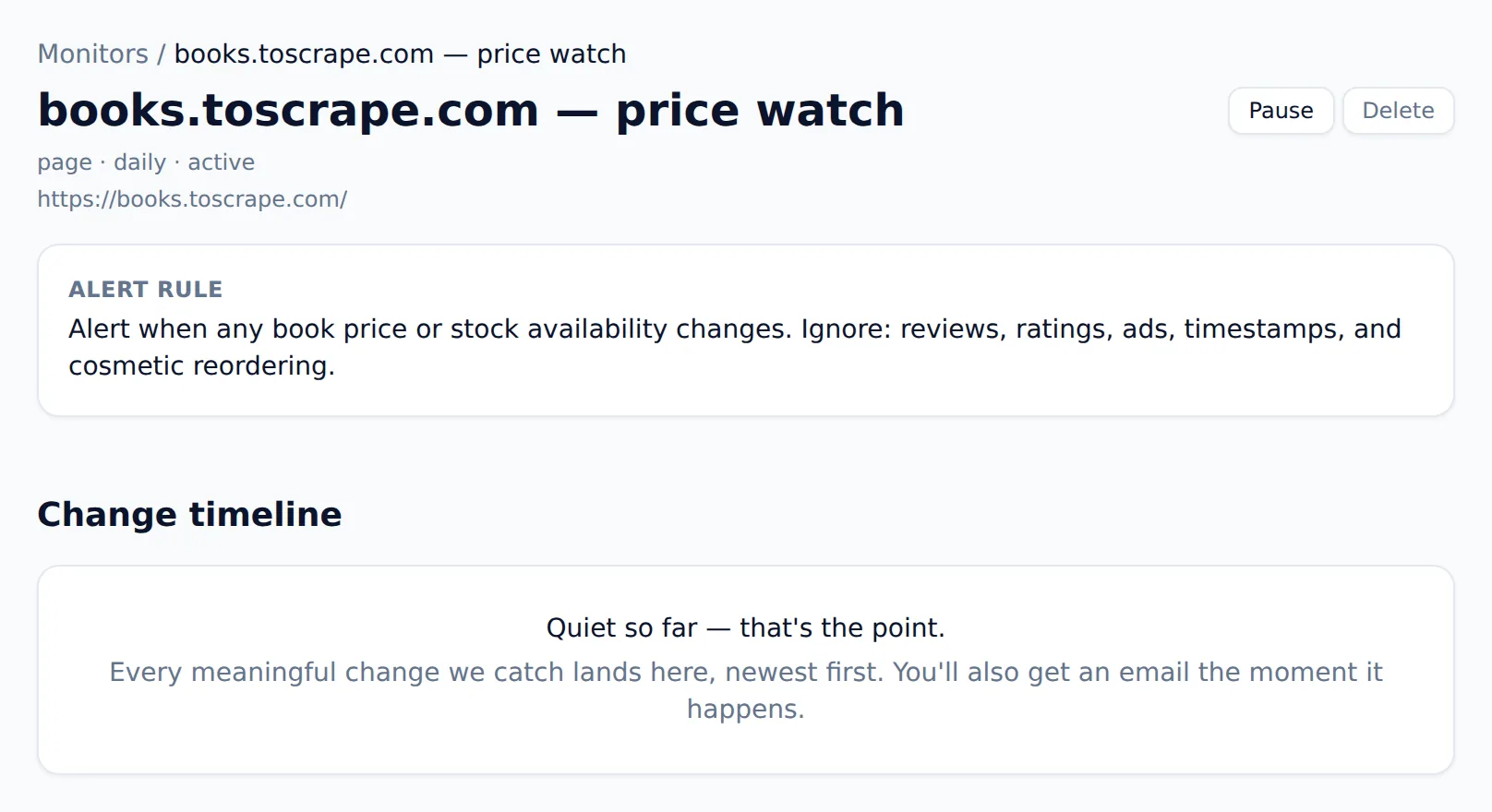
Both tools can tell you a page changed. The difference is what counts as changed. Website Scraper's monitors read each change against the alert rule you wrote — a price moved, an item sold out, a job posting appeared — and stay silent on rotating banners, view counters, and timestamps. If you've ever muted a change monitor because it cried wolf, this is the fix. Checks run daily on Starter, hourly on Pro ($49), every 15 minutes on Business ($129). If price tracking is the whole reason you're here, the website price scraper page walks through scraping a store's prices and watching them for drops specifically.
Try it before you trust it
The homepage is the product: paste a URL and run your first scrape logged out, no account, no card, nothing to install. I set it up that way because extraction quality is the whole question, and you shouldn't have to sign up to answer it. One boundary worth knowing before you test: Website Scraper honors robots.txt and refuses sensitive categories (banking, government, people-search). If your work requires going around a site's rules, this isn't the tool.

How do I switch from Browse AI to Website Scraper?
For a typical setup, switching is about ten minutes of re-describing rather than rebuilding, and neither side locks your data in.
- Export your historical data from Browse AI (CSV or Google Sheets) so you keep continuity.
- List your active robots — each one's target URL and the columns it extracts.
- Recreate each as a saved scraper: paste the URL, describe the fields in plain English ("company name, job title, salary, posting date"), and check the table. There is no training step.
- Set up monitors for anything Browse AI was watching, and describe what counts as a meaningful change so the alerts stay quiet otherwise.
- Re-point integrations. If you consumed Browse AI's webhooks or API, swap endpoints to Website Scraper's REST API or outbound webhooks (Pro and up).
- Run both in parallel for a few days, compare outputs, then cancel or downgrade. The free tier (25 credits/month, no card) validates most setups before you pay anything.
Frequently asked questions
Is Website Scraper cheaper than Browse AI?
For most solo users and small teams, yes. My Starter plan is $19/month for 1,000 pages with no annual commitment. Browse AI's Personal plan costs $48/month billed monthly; its $19/month price requires annual billing. Website Scraper credit packs also never expire, which matters if your usage comes in bursts.
Do I have to train robots with Website Scraper like in Browse AI?
No. Browse AI asks you to record a task so a robot can learn from your clicks. Website Scraper skips the step: paste a URL, describe the data in plain English, and the AI returns a table. There are no selectors or recorded steps to maintain, so redesigns don't break anything you built.
Can Website Scraper monitor pages for changes like Browse AI?
Yes. Both tools re-check pages on a schedule. The difference is what earns an alert: Website Scraper reads every change against the alert rule you wrote, so a price drop or new listing notifies you while a rotating timestamp stays silent. Checks run daily, hourly, or every 15 minutes depending on plan.
What happens to my credits if a scrape fails?
Nothing — failed scrapes are refunded automatically, so you only pay for pages that return data. Credit packs ($9 for 300, $29 for 1,200) never expire, so occasional users aren't pushed onto a subscription they don't need. If you cancel, your data stays exportable for 30 days.
The bottom line
Browse AI earns its price when the job needs trained multi-step robots, prebuilt templates, or enterprise monitoring. When the job is "get this data into a table and tell me when it meaningfully changes," that's the job I built Website Scraper to do — with less setup and billing you never have to decode: 1 credit = 1 page, failures refunded, packs that never expire, no annual asterisk.
Start with the free plan's 25 monthly credits, or just run a scrape from the homepage without signing up at all. Full plan details are on the pricing page. If Website Scraper doesn't beat your Browse AI workflow inside ten minutes, keep what works. And if you're weighing more than these two, my roundup of the best AI web scrapers compares seven tools on the same credit-math terms.