Python Web Scraping Tutorial (2026): BeautifulSoup, Step by Step
By Ashesh DhakalUpdated 10 min read
Web scraping in Python has barely changed in a decade, and that's the best thing about it: requests plus BeautifulSoup is still the shortest path from "there's data on this page" to "the data is in my CSV." This tutorial builds a working Python program to scrape a website, from empty folder to exported CSV. I ran every snippet in this post against the live site; the output you see is the output I got, including one genuine bug I hadn't planned for. If you'd rather skip code entirely, an AI website scraper does the same job from a pasted URL — I compare the two paths honestly at the end. The code is worth understanding first.
We'll scrape books.toscrape.com, a public sandbox built specifically for scraping practice: 1,000 fictional book listings, no terms-of-service worries, no bot detection.
What do I need to install to scrape a website with Python?
Python 3 and two libraries: requests, which downloads web pages over HTTP, and beautifulsoup4, which parses the downloaded HTML into a searchable tree. One pip command installs both, and for static websites that's the entire toolchain. No framework, no browser driver, no API key.
Check your Python version first (anything 3.9+ works; I'm on 3.11):
python3 --version
# Python 3.11.15
Then install both libraries:
pip install requests beautifulsoup4
One naming trap before you go further: the package is beautifulsoup4 on PyPI, but you import it as bs4. Nearly everyone hits this once. And if you pip install BeautifulSoup — no 4 — you get an abandoned Python 2 package and an error message that explains nothing.
Verify the install:
import bs4, requests
print(bs4.__version__, requests.__version__)
# 4.15.0 2.33.1
Two version numbers printed means you're ready.
How do I fetch a webpage with Python requests?
Call requests.get(url) and you get back a Response object: the status code, the headers, and the page's raw HTML as text. A status code of 200 means success. Always pass a timeout — requests will happily wait forever on a hung server, and your script hangs with it.
import requests

url = "https://books.toscrape.com/"
response = requests.get(url, timeout=10)

print(response.status_code)
print(response.headers["Content-Type"])
print(len(response.text))
Output:
200
text/html
51294
Three parts of that Response object do almost all the work:
response.text— the HTML as a string. This is what you hand to BeautifulSoup.response.status_code— 200 is success, 404 means the page doesn't exist, 403 means the server refused you. More on 403s later, because you will meet them.response.raise_for_status()— raises an exception on any 4xx/5xx code. Use it in real scripts. A scraper that silently parses an error page is worse than one that crashes.
How do I parse HTML with BeautifulSoup?
Pass the HTML string to BeautifulSoup(html, "html.parser") and you get a navigable tree of the document. From there, soup.title grabs the title tag, and select_one() finds the first element matching any CSS selector — the same selectors you'd write in browser DevTools.
Look at the page before writing selectors. Open books.toscrape.com, right-click a book, and choose Inspect. Each book is an <article class="product_pod"> holding an <h3> with a link (the title lives in the link's title attribute) and a <p class="price_color"> with the price.
import requests
from bs4 import BeautifulSoup

url = "https://books.toscrape.com/"
response = requests.get(url, timeout=10)
soup = BeautifulSoup(response.text, "html.parser")

print(soup.title.get_text())

first_book = soup.select_one("article.product_pod")
print(first_book.h3.a["title"])
print(first_book.select_one("p.price_color").get_text())
Output:
    All products | Books to Scrape - Sandbox

A Light in the Attic
£51.77
It works. Then you look at the price: £51.77.
That stray  is not a typo in this post. It's what my terminal actually printed the first time I ran this snippet, and I nearly published the tutorial without catching it. It's also one of the most common real-world scraping bugs, so let's fix it properly instead of pretending it didn't happen.
What's going on: the server sends Content-Type: text/html without declaring a charset, so requests falls back to assuming Latin-1 while the page is actually UTF-8. The two-byte UTF-8 sequence for £ gets decoded as two separate characters. The fix is one line, set before you read response.text:
response.encoding = "utf-8"
Every snippet from here on includes it. When you see garbled characters like £, ’, or é in scraped data — yours or anyone else's — this is almost always why.
How do I extract a full dataset with CSS selectors?
Use soup.select() (plural) to get every element matching a selector, then loop over the matches, pulling each field out with select_one() relative to the current element. Build a list of dictionaries, one per row. That shape converts cleanly to CSV or a pandas DataFrame later.
Three selector patterns cover most scraping work:
| Selector | Matches | Example |
|---|---|---|
article.product_pod | <article> tags with class product_pod | Each book card |
p.price_color | <p> tags with class price_color | The price inside a card |
p.instock.availability | <p> with both classes | The stock indicator |
Here's the full extraction: title, price, star rating, and stock status for every book on the page.
import requests
from bs4 import BeautifulSoup

url = "https://books.toscrape.com/"
response = requests.get(url, timeout=10)
response.encoding = "utf-8"   # the server forgets to declare its charset
soup = BeautifulSoup(response.text, "html.parser")

books = []
for card in soup.select("article.product_pod"):
    title = card.h3.a["title"]
    price = card.select_one("p.price_color").get_text()
    rating = card.select_one("p.star-rating")["class"][1]
    in_stock = "In stock" in card.select_one("p.instock.availability").get_text()
    books.append({"title": title, "price": price, "rating": rating, "in_stock": in_stock})

print(f"Found {len(books)} books")
for book in books[:3]:
    print(book)
Output:
Found 20 books
{'title': 'A Light in the Attic', 'price': '£51.77', 'rating': 'Three', 'in_stock': True}
{'title': 'Tipping the Velvet', 'price': '£53.74', 'rating': 'One', 'in_stock': True}
{'title': 'Soumission', 'price': '£50.10', 'rating': 'One', 'in_stock': True}
The rating line deserves a comment. The site encodes star ratings as a second CSS class (<p class="star-rating Three">), so ["class"][1] reads the rating straight off the class list. Real sites stash data in attributes like this constantly. Check attributes, not just text.
How do I scrape multiple pages (pagination)?
Click the site's Next button and watch the address bar: the URL becomes /catalogue/page-2.html. A numeric pattern like that means you can loop over page numbers instead of chasing Next links. Wrap your parsing code in a function, call it per page, stop on a 404, and sleep between requests.
import csv
import time

import requests
from bs4 import BeautifulSoup

BASE = "https://books.toscrape.com/catalogue/page-{}.html"

def scrape_page(page_number):
    response = requests.get(BASE.format(page_number), timeout=10)
    if response.status_code == 404:
        return None  # ran past the last page
    response.raise_for_status()
    response.encoding = "utf-8"
    soup = BeautifulSoup(response.text, "html.parser")
    rows = []
    for card in soup.select("article.product_pod"):
        rows.append({
            "title": card.h3.a["title"],
            "price": card.select_one("p.price_color").get_text().lstrip("£"),
            "rating": card.select_one("p.star-rating")["class"][1],
        })
    return rows

all_books = []
for page in range(1, 6):          # first 5 pages; raise to 51 for the full catalog
    rows = scrape_page(page)
    if rows is None:
        break
    all_books.extend(rows)
    print(f"Page {page}: {len(rows)} books (total {len(all_books)})")
    time.sleep(1)                  # be polite: 1 request per second

with open("books.csv", "w", newline="", encoding="utf-8") as f:
    writer = csv.DictWriter(f, fieldnames=["title", "price", "rating"])
    writer.writeheader()
    writer.writerows(all_books)

print(f"Wrote {len(all_books)} rows to books.csv")
Output:
Page 1: 20 books (total 20)
Page 2: 20 books (total 40)
Page 3: 20 books (total 60)
Page 4: 20 books (total 80)
Page 5: 20 books (total 100)
Wrote 100 rows to books.csv
And the resulting file:
title,price,rating
A Light in the Attic,51.77,Three
Tipping the Velvet,53.74,One
Soumission,50.10,One
Two habits in that script matter more than their line count suggests:
time.sleep(1)— one request per second. Scraping too fast is the fastest way to get your IP blocked, and it's rude to the site's servers either way.- Stripping the
£before writing the CSV. Store prices as plain numbers. Future you, trying to sum a column of£51.77strings in a spreadsheet, will be grateful.
Not every site has numeric page URLs. The fallback is following the Next link itself: grab soup.select_one("li.next a")["href"], resolve it against the current URL with urllib.parse.urljoin, and loop until no Next link exists.
What are the most common web scraping errors (and fixes)?
Four failures account for most broken scrapers: 403 Forbidden responses, empty results on JavaScript-rendered pages, AttributeError: 'NoneType' from selectors that matched nothing, and mangled characters from encoding mismatches. Each has a distinct signature, and recognizing which one you're looking at is half the fix.
403 Forbidden. The server saw User-Agent: python-requests/2.33.1 and decided not to serve you. Send a browser-like header:
headers = {
    "User-Agent": "Mozilla/5.0 (Windows NT 10.0; Win64; x64) "
                  "AppleWebKit/537.36 (KHTML, like Gecko) "
                  "Chrome/126.0.0.0 Safari/537.36"
}
response = requests.get(url, headers=headers, timeout=10)
That fixes the easy cases. Sites behind serious bot protection (Cloudflare and friends) check far more than the User-Agent: TLS fingerprints, JavaScript challenges, IP reputation. Getting past that reliably means residential proxies and browser automation, which is a project in itself — and exactly the infrastructure a hosted scraping tool maintains so you don't have to.
JavaScript-rendered pages. The request succeeds, the status is 200, and soup.select(...) returns nothing. The data was never in the HTML; the browser built it with JavaScript after load. Ten-second diagnosis: view the page source (Ctrl+U — the source, not DevTools) and search for the data you want. If it isn't there, requests can't reach it. You need a real browser engine, Playwright or Selenium in Python, or a scraper that renders JavaScript for you.
Broken selectors. select_one() returns None when nothing matches, so the error surfaces one line later than the mistake:
price = soup.select_one("span.price")   # wrong selector: the class is p.price_color
print(price.get_text())
AttributeError: 'NoneType' object has no attribute 'get_text'
This is also what a site redesign looks like from your scraper's point of view: a script that ran nightly for six months starts throwing NoneType errors because someone renamed a class. Guard the fields you care about and log loudly:
price_el = card.select_one("p.price_color")
price = price_el.get_text() if price_el else None
Encoding mismatches. Covered above. Set response.encoding = "utf-8" when you see £-style garbage, or hand BeautifulSoup response.content (raw bytes) and let it detect the encoding itself.
Do I need Python at all, or can a no-code scraper do this?
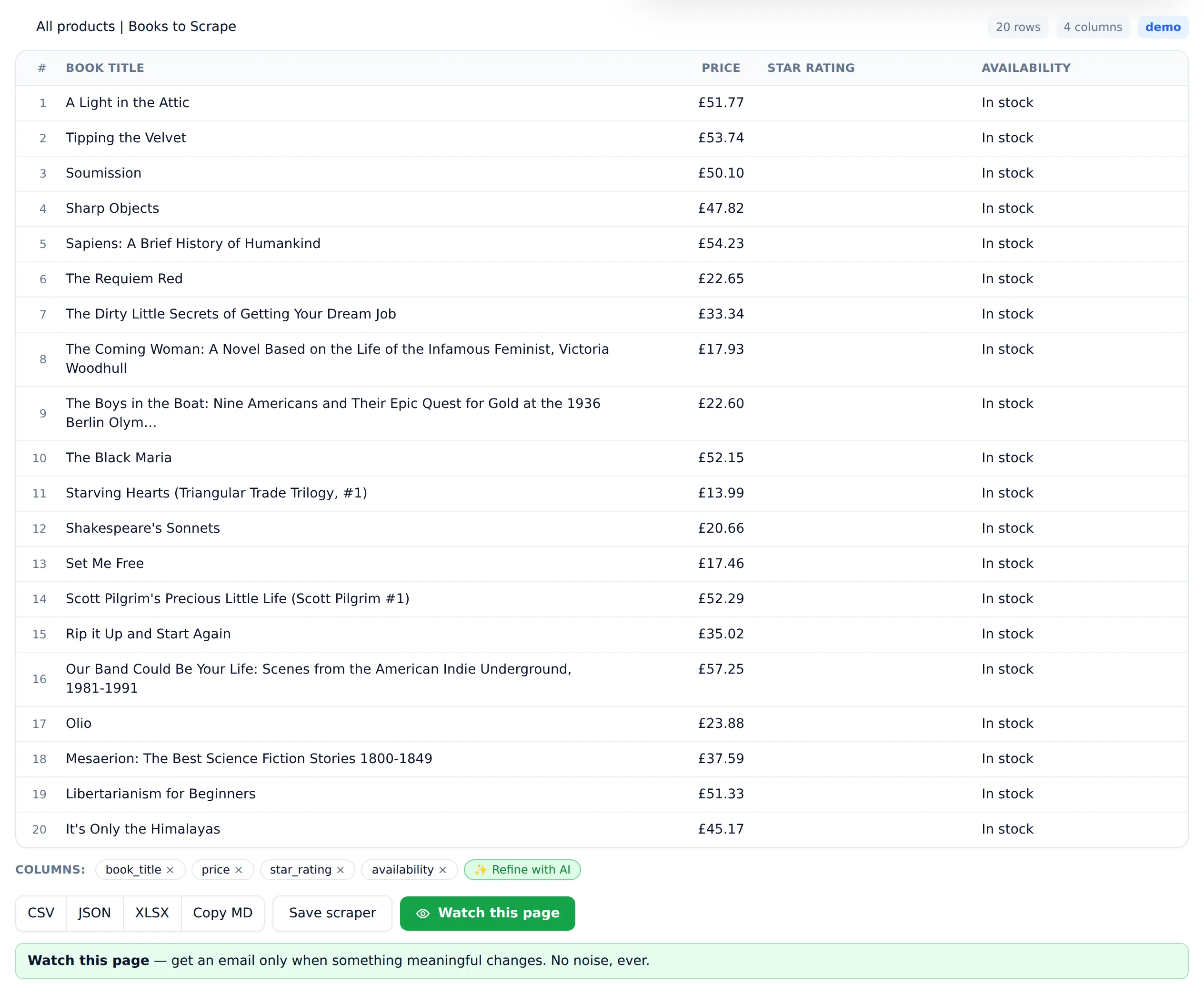
For a one-off extraction, you don't need Python. Paste the URL into Website Scraper and the AI identifies the book listings, extracts title, price, rating, and availability into a table, and gives you a CSV download. No selectors to write, no encoding bugs to chase, no rewrite when the site's markup changes.
Full disclosure: I build Website Scraper, so weigh my bias accordingly. But I've now done this exact job both ways in one sitting, and the comparison below is as straight as I can make it.
| Python + BeautifulSoup | No-code AI scraper | |
|---|---|---|
| Setup | Install Python + 2 libraries | None — paste a URL |
| First dataset | ~30–60 min if you're learning | Under a minute |
| JavaScript-heavy sites | Add Playwright/Selenium yourself | Handled for you |
| Site redesigns | Selectors break; you fix them | AI re-detects the fields |
| Custom logic mid-scrape | Unlimited — it's your code | Limited to the tool's features |
| Recurring monitoring | Cron + hosting + alerting to build | Built in |
| Cost | Free (your time is the cost) | Free tier: 25 pages/month |
Code wins when scraping is one step in a bigger pipeline: you're joining the data against a database, transforming rows mid-scrape, or running at a scale where owning the infrastructure pays for itself. Everything in this tutorial is exactly the skill set that takes, and it's worth having.
The tool wins for one-offs, for prototyping ("is this data even extractable?"), for pages behind JavaScript or bot protection you don't feel like reverse-engineering, and for anyone on your team who doesn't write Python. Failed scrapes are never charged — they're refunded automatically — so testing a stubborn page costs nothing.
If you want the wider decision framework, including browser extensions as a third option, read How to Scrape Data from Any Website; the single-page version is How to Scrape a Webpage: 3 Methods Compared. To try the no-code path on a real page, the free web scraper includes 25 pages a month, no card required — and once the table looks right it can export straight to Excel or monitor the page for changes.
Either way, you now have a working, tested Python web scraper that runs end to end: fetch, parse, extract, paginate, export. Point it at a real target, keep the time.sleep, and read the site's terms before you scale it up. Prefer a different language? The same job, step by step, in JavaScript, PHP, Ruby, Go, and Java.