Web Scraping Without Code: The Complete Guide
By Ashesh DhakalUpdated 9 min read
Five years ago, scraping a website meant Python, CSS selectors, and a weekend of debugging. In 2026 you paste a URL into a website scraper, type "company name, funding round, amount" in plain English, and have a spreadsheet before your coffee cools. I write code for a living and I built a no-code scraper anyway, because most extraction jobs never deserved a script. This guide covers what the no-code route genuinely handles now, from single pages to whole-site crawls to standing monitors, plus the honest limits where code is still required.
What can you scrape without writing code in 2026?
Nearly any publicly visible page: product listings, directories, job boards, real-estate listings, news indexes, review pages, tables buried in prose. Current no-code tools handle pagination, whole-site crawls, scheduling, and change alerts. The remaining hard cases are logins, aggressive anti-bot systems, and very high volume.
Think of no-code scraping as a ladder. Every rung below was developers-only not long ago:
- One page → one table. The base case: a URL plus a field description produces structured rows. This covers JavaScript-heavy pages too — React apps, infinite scroll, late-loading content — because the page is rendered in a real browser before extraction. The sites that choke simpler fetchers are exactly the ones worth testing first.
- Many pages → one table. Give the tool a listing page and it follows pagination ("next" buttons, page-2-3-4 links, infinite scroll), collecting every item into one dataset.
- Whole-site crawls. Point at a domain, let the crawler discover pages (products, articles, profiles), and extract the same schema from each.
- Scheduled scrapes. Any saved scraper re-runs hourly, daily, or weekly, appending fresh data. A price history or inventory log builds itself.
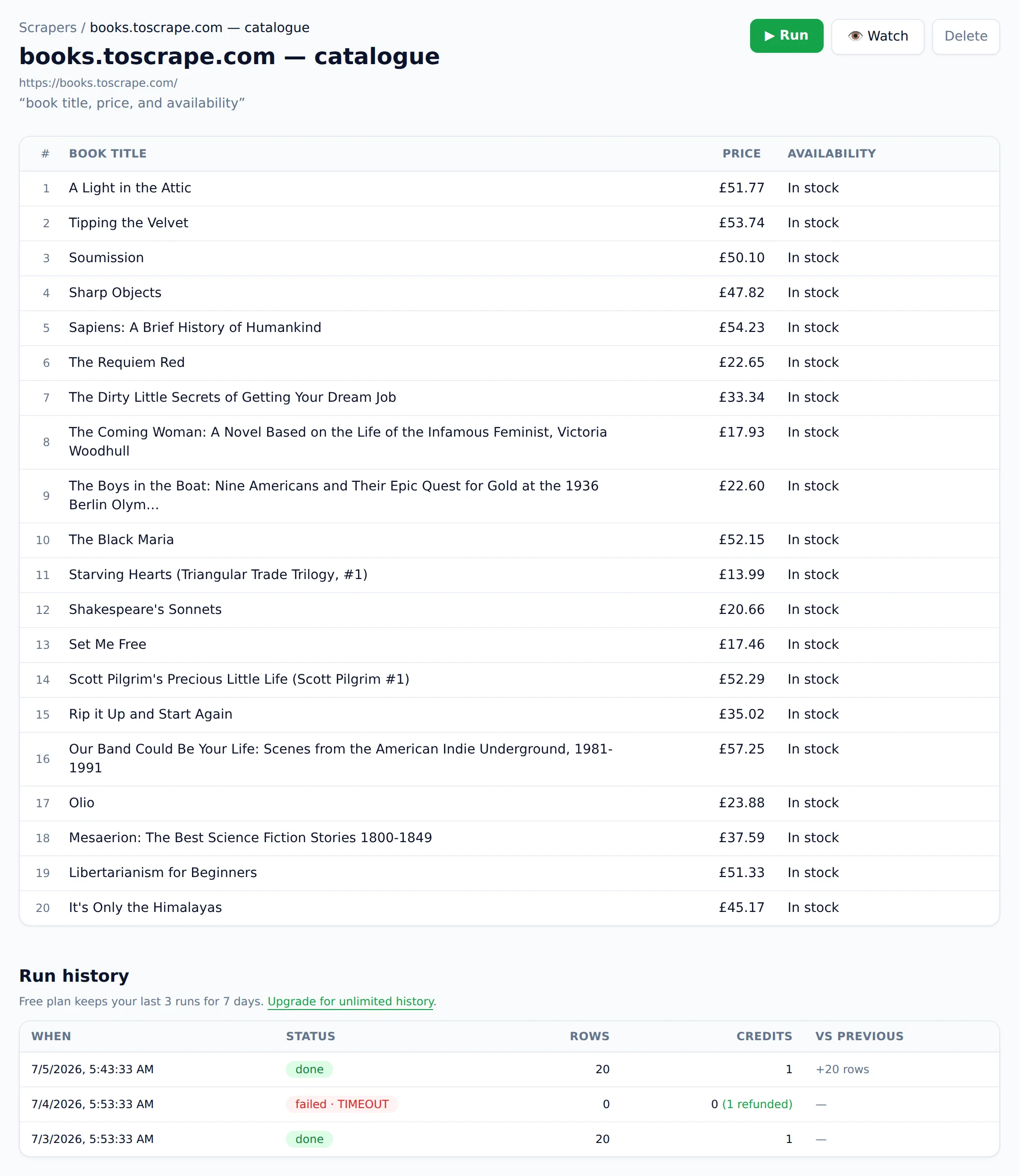
- Change monitoring with alerts. The tool re-scrapes on a schedule, compares extracted data rather than raw HTML, and notifies you only when something meaningful changed: a price moved, an item went out of stock, a new job was posted. You can see exactly what changed, added, removed, or edited, in a change history.
That last rung is where AI extraction quietly changed the category, and it's the part I'd defend hardest. Old-style page monitors diff raw HTML, so a rotating banner or a fresh timestamp trips a false alarm on every check, and within a week you stop reading the alerts. Comparing structured fields means an alert carries information, and a good monitor tells you why it fired. The bar worth holding any tool to: no noise, ever. For how the AI layer underneath works, see my AI web scraping guide.
How do you scrape a website step by step (no code)?
Paste the page URL, describe the data you want in plain English, and run it. The AI reads the rendered page and returns a table matching your description, which you export or save. A first scrape takes under a minute; a saved scraper re-runs on demand or on a schedule.
Here's the full workflow in Website Scraper, using books.toscrape.com, a demo bookstore built for scraping practice:
Step 1 — Paste the URL. Drop https://books.toscrape.com/ into the input on the homepage. The tool fetches and renders the page the way a browser would, so JavaScript-loaded content is included.
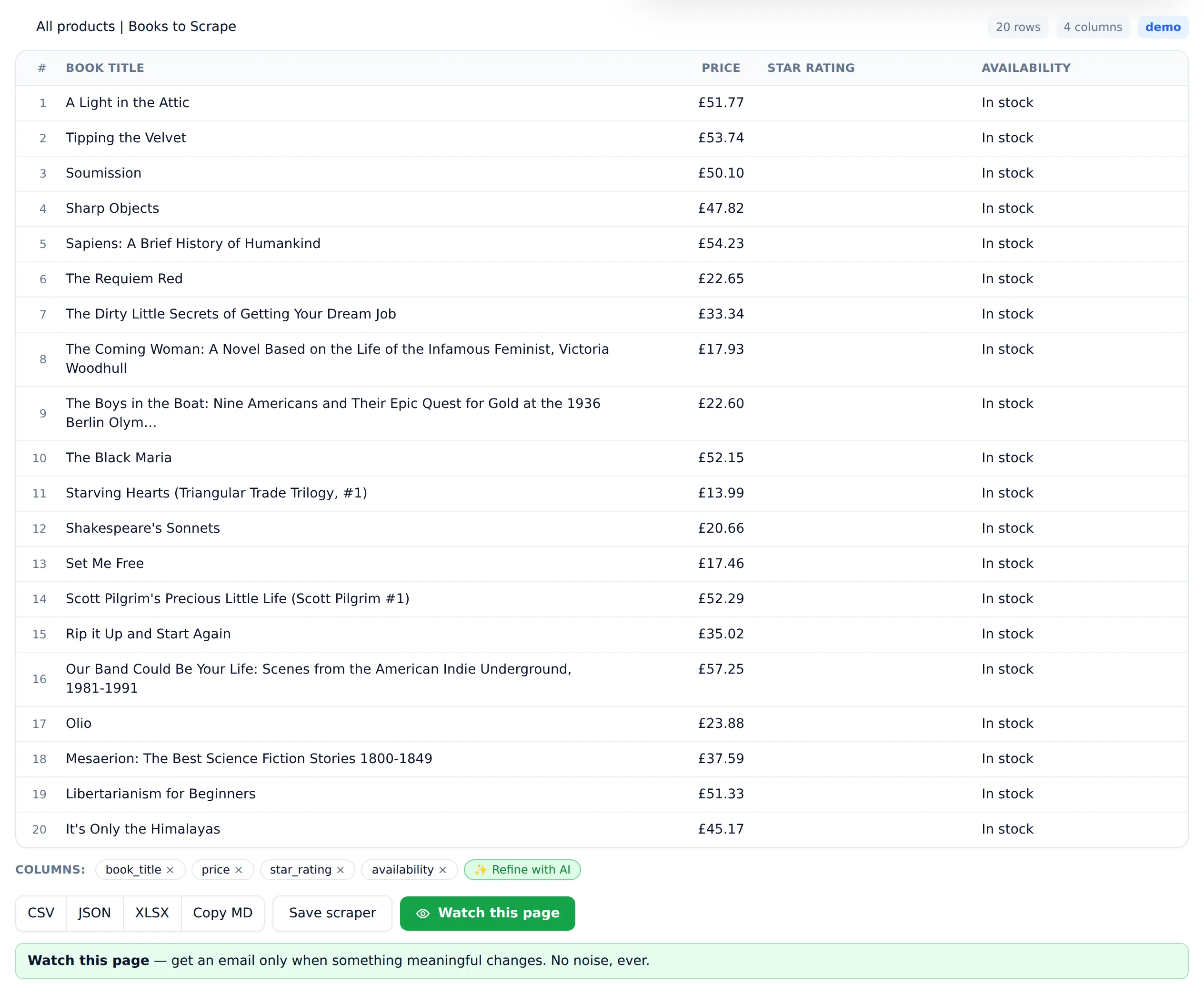
Step 2 — Describe the data. Type what you want as if briefing a person: "book title, price, star rating, in stock or not." No selectors, no XPath, no sample-clicking. Specificity pays. "Price in GBP as a number" beats "price" if you plan to sort or average the column.
Step 3 — Run and review. You get a table back: 20 rows, four columns, one row per book on the page. Spot-check a few rows against the live page. That's a good habit on any new scraper, whatever tool you use.
Step 4 — Extend to all pages. The bookstore has 50 pages of listings. Enable pagination and the scraper walks every one, producing 1,000 rows in one dataset instead of 20.
Step 5 — Export or automate. Download CSV/JSON/XLSX for one-off jobs. For recurring needs, save the scraper, add a schedule, and optionally an alert rule like "notify me when any price changes."
One credit = one page scraped, so that 50-page crawl costs 50 credits, and a failed page costs nothing. The bill should read like a receipt; per-page pricing with automatic refunds on failures is how you keep it that way. If you're curious what all this replaces, my Python web scraping tutorial builds the equivalent by hand. It's a fair fight: an afternoon of code against a minute of typing.
Which no-code scraping tool type should you choose?
Choose by where the data lives and how often you need it: browser extensions for pages behind your own login, copy-paste or free tiers for one-off jobs, and a scraping SaaS for anything recurring, scheduled, or monitored. Point-and-click workflow builders fit complex navigation but demand real setup time.
| Tool type | Best for | Watch out for |
|---|---|---|
Copy-paste / spreadsheet imports (e.g. Sheets' IMPORTHTML) | One simple, well-formed HTML table | Fails on JavaScript-rendered pages; no structure control |
| Browser extensions | Pages you're logged into; quick grabs while browsing | Tied to your open browser; weak scheduling; per-row billing is common |
| Point-and-click workflow builders | Multi-step navigation: menus, forms, dropdowns | Hours of setup; selector-based workflows break on redesigns |
| AI scraping SaaS | Recurring extraction, crawls, scheduled monitoring | Per-page cost; can't reach behind logins |
| Developer APIs | Feeding data into apps and pipelines | Requires code — not actually no-code |
A pragmatic sequence: start with the free tier of an AI SaaS for anything public and recurring, keep an extension around for the occasional logged-in page, and escalate to a workflow builder only if your target genuinely requires clicking through multi-step navigation to reach the data. I compared specific products across these categories in my roundup of the best AI web scrapers, including the places where mine loses.
What are the real limits of no-code scraping?
Three walls: authentication (logins, paywalls, per-account data), heavy anti-bot defenses (aggressive CAPTCHAs, fingerprinting, IP blocks), and extreme scale, meaning millions of pages where per-page pricing bites. Most public-web extraction jobs hit none of them. Work out which wall yours faces before you pick tools.
Logins and paywalls. A cloud scraper visits pages as an anonymous visitor. If the data only exists behind your account — a private dashboard, a subscription site, your CRM — a server-side no-code tool can't see it. Browser extensions partially solve this because they ride your existing session, but read the site's terms first: scraping authenticated areas is where legal risk concentrates, and it can cost you the account regardless of legality.
Anti-bot systems. Some sites invest heavily in blocking automated access: CAPTCHA walls, browser fingerprinting, rate-limit bans. Reputable no-code tools handle the routine cases, rendering, sane pacing, retrying harder when a page pushes back, but a site determined to block bots will sometimes win. I'd rather say that plainly than promise you a success rate. Expect occasional failed scrapes on protected sites, which is exactly why failure billing matters; ours charges nothing for a failed page.
Extreme scale. No-code pricing is built for thousands to hundreds of thousands of pages a month. At millions of pages, per-page economics favor developer-built pipelines, and a no-code UI becomes the wrong interface for managing the job anyway. If you're headed there, budget for engineering.
A fourth, softer limit: judgment. No tool exempts you from thinking about what you scrape. Public facts like prices and specs are the safe zone; personal data and copyrighted content carry real obligations under GDPR, CCPA, and copyright law. The legality section of my AI web scraping guide covers the contours, along with how a scraper can behave respectfully by design.
How do you get scraped data where you need it?
Every serious no-code scraper exports CSV, JSON, and XLSX for download. For recurring use, look for API access to pull results programmatically and webhooks that push each run's data to a URL you control. Downloads suit one-off analysis; webhooks suit automation; APIs suit software that asks on demand.
- CSV — the universal currency. Opens in Excel, Google Sheets, and every BI tool. Best for flat tables; mind the encoding if your data has non-Latin characters.
- XLSX — same data, friendlier for colleagues who live in Excel; preserves types (numbers stay numbers) better than CSV round-trips. For the full walkthrough, see how to scrape a website to Excel.
- JSON — for nested data and anything a developer or script consumes downstream. The natural format when one scraped item has sub-structures, like a product with a list of variants.
- API access — your other tools fetch results on their schedule: a dashboard that queries the latest run, a script that pulls the week's data every Monday. See the API docs for the request format.
- Webhooks — the push model: each completed run POSTs its results to your endpoint. Pair with Zapier/Make-style platforms and scraped data lands in Sheets, Slack, Airtable, or a database with zero code on your side.
A pattern that covers most teams: schedule the scraper daily, webhook the results into a Google Sheet, and let the alert rule ping you only when a monitored field changes. Alerts should be signed and retried, so a blip on your endpoint never means a missed change. Data flows continuously; you look only when there's something to see.
Is no-code scraping right for your project?
If the data is publicly visible, your volume is under a few hundred thousand pages a month, and your time is worth more than a few cents a page, no-code is the right default in 2026. Reserve code for authenticated sources, extreme scale, or scraping buried deep inside custom software.
The economics have simply inverted, and I watched it happen from both sides. When extraction required code, the question was "is this data worth a developer-week?" and the answer was usually no, so the data went uncollected. At a couple of cents per page and a one-minute setup, the question becomes "is this worth a dollar and a minute?" Whole categories of small, useful datasets — competitor prices, job postings in your niche, inventory on twelve supplier sites — suddenly clear the bar.
Start where it's free: Website Scraper's free plan includes 25 page scrapes a month, no credit card required. Run your actual target site through it, not a demo, your real one, and you'll know within five minutes whether the no-code route covers your case. If it does, paid plans start at $19/month for 1,000 pages, credit packs never expire, and failed scrapes never cost a credit.