How to Scrape Data from Any Website (No Code + Code Methods)
By Ashesh DhakalUpdated 10 min read
Every guide to scraping data from a website is written by someone selling one particular answer. The Python blog says learn Python; the extension company says install their extension. I build an AI website scraper, so I have a horse in this race too — which is why this guide compares all three real methods honestly, including the cases where my tool is the wrong choice. There are three genuinely different ways to get data off a website, and the right one depends on how much data you need, how often you need it, and whether anyone on your team writes code. You can make that call in the next five minutes. The decision table below is most of the answer.
What are the main ways to scrape data from a website?
Three practical methods: no-code AI scrapers that turn a pasted URL into structured rows; code, usually Python with requests and BeautifulSoup (or Playwright for JavaScript-heavy pages); and point-and-click browser extensions that scrape the page you're looking at. They differ mainly in setup time, scale ceiling, and what breaks when a website changes.
It helps to name what "scraping data" actually means before comparing: taking the semi-structured content of a web page — product cards, table rows, listings, articles — and turning it into rows and columns you can sort, filter, and analyze. Usually that ends as a CSV or a spreadsheet. All three methods produce the same output. They differ in who does the work.
Method 1: No-code AI scrapers. Paste a URL; an AI model reads the rendered page, finds the repeating records and their fields, and returns a table. Modern ones run headless browsers, so JavaScript-heavy pages work. Best effort-to-output ratio for most people, priced per page scraped.
Method 2: Code. You write a program that downloads pages and extracts fields with CSS selectors. Total control, zero marginal cost, integrates with anything. You also own the maintenance, and selectors break silently when sites redesign. Nobody tells you; your data just stops.
Method 3: Browser extensions. Install one, open the target page, click the elements you want. Fine for occasional single-page grabs. Increasingly awkward once you add pagination, scheduling, or more than a handful of pages, because your browser has to stay open and driving.
There's a fourth option that isn't scraping at all: check whether the site offers an official API or a bulk export. Spend two minutes looking — an API is more stable and more clearly sanctioned than any scraper. Most sites don't offer one for the data you actually want, which is why the other three methods exist.
Which scraping method should I choose?
Ask three questions: how many pages, how often, and does anyone available write code? One-off and recurring jobs under a few thousand pages favor no-code tools. Pipeline-embedded or very high-volume scraping favors code. A single visible table favors an extension — or, honestly, copy-paste.
| No-code AI scraper | Python / BeautifulSoup | Browser extension | |
|---|---|---|---|
| Coding required | None | Python | None |
| Setup time | None (paste a URL) | Install + write script | Install + configure clicks |
| Time to first dataset | ~1 minute | 30+ minutes (more if learning) | ~10 minutes |
| JavaScript-rendered pages | Yes (headless browser) | Only with Playwright/Selenium | Yes (it is the browser) |
| Survives site redesigns | AI re-detects fields | Selectors break; you fix them | Click-maps break; you redo them |
| Pagination / many pages | Built in | You write the loop | Varies; often clunky |
| Scheduled monitoring | Built in | Cron + hosting + alerts (DIY) | Usually requires browser open |
| Custom transform logic | Limited | Unlimited | Very limited |
| Runs while your laptop is closed | Yes (cloud) | If you host it | Usually no |
| Typical cost | Free tier, then per-page credits | Free; your time + hosting | Free tier, then subscription |
A few asymmetries the table can't hold:
- Code's real cost is maintenance, not writing. The first script is fun. The tenth fix after a site redesign is not. If the data matters to your business weekly, budget for upkeep or use a tool that absorbs it.
- No-code tools have a ceiling, including mine. If you need to log in with 2FA, drive a multi-step interaction, or apply business logic mid-extraction ("only follow links where the price dropped more than 10%"), write code. Per-page pricing also stops making sense somewhere in the tens of thousands of pages a month; at that scale, engineering pays for itself.
- Extensions occupy an awkward middle. They demo brilliantly on one page. The friction shows up at page 40 of a paginated list, or the first time you want a scrape to run while you're asleep.
Leaning toward code? The Python web scraping tutorial builds a complete scraper with requests and BeautifulSoup — every snippet in it was run against a live site before publishing. If your job is one page rather than a whole site, the shorter how to scrape a webpage comparison is more direct.
Is it legal to scrape data from a website?
Scraping publicly accessible data is generally permitted in many jurisdictions, and courts have repeatedly declined to treat access to public pages as inherently unlawful. But "generally permitted" is not "anything goes": terms of service, copyright, database rights, privacy statutes, and anti-intrusion laws all constrain what and how you scrape. This is not legal advice.
A practical checklist that keeps most projects on safe ground:
- Scrape only what's public. Data behind a login, paywall, or access control is a different legal category, and bypassing technical barriers to reach it can implicate computer-misuse laws.
- Read the terms of service. Many sites prohibit automated access in their ToS. Whether those terms bind a non-logged-in visitor varies by jurisdiction and case, but violating them knowingly is a risk to take deliberately, not by accident.
- Check robots.txt. Not law, but it's the site's explicit statement of what automated agents are welcome to fetch. Respecting it is an ethical norm and useful evidence of good faith.
- Be careful with personal data. Names, emails, phone numbers, and profiles are regulated by GDPR (EU), CCPA/CPRA (California), and similar laws — even when publicly posted. Scraping personal data for marketing lists is where enforcement actions actually happen.
- Don't republish copyrighted content wholesale. Extracting facts (prices, specs, dates) sits on much firmer ground than copying and re-hosting articles, images, or reviews.
- Keep request rates polite. Hammering a site degrades it for real users and, in extreme cases, starts to resemble a denial-of-service attack. One request per second per site is a common courtesy baseline; hosted tools typically rate-limit for you.
The compressed version: public data, gently collected, used in ways that don't harm the source site or the people in the data, is the defensible zone. This is also how I built Website Scraper to behave — it honors robots.txt and refuses certain categories outright, because staying in that zone shouldn't depend on every user knowing the rules. If your plan involves personal data at scale, circumventing blocks, or competing with the source site using its own content, talk to a lawyer first.
How do I scrape data from a website without coding (step by step)?
Paste the page URL into a no-code AI scraper, let it render the page and detect the repeating records, review the extracted table, and export CSV. With Website Scraper that's four steps and roughly a minute; a free account includes 25 pages per month to test with. Here's each step in detail.
Step 1 — Pick your target page and sanity-check it. Open the page in your browser. Can you see the data you want, laid out as repeating items (cards, rows, listings)? Scrapers extract what's on the page — if the data only appears after a login or a form, that's a harder problem. For practice, use https://books.toscrape.com/, a public sandbox bookstore built for exactly this.
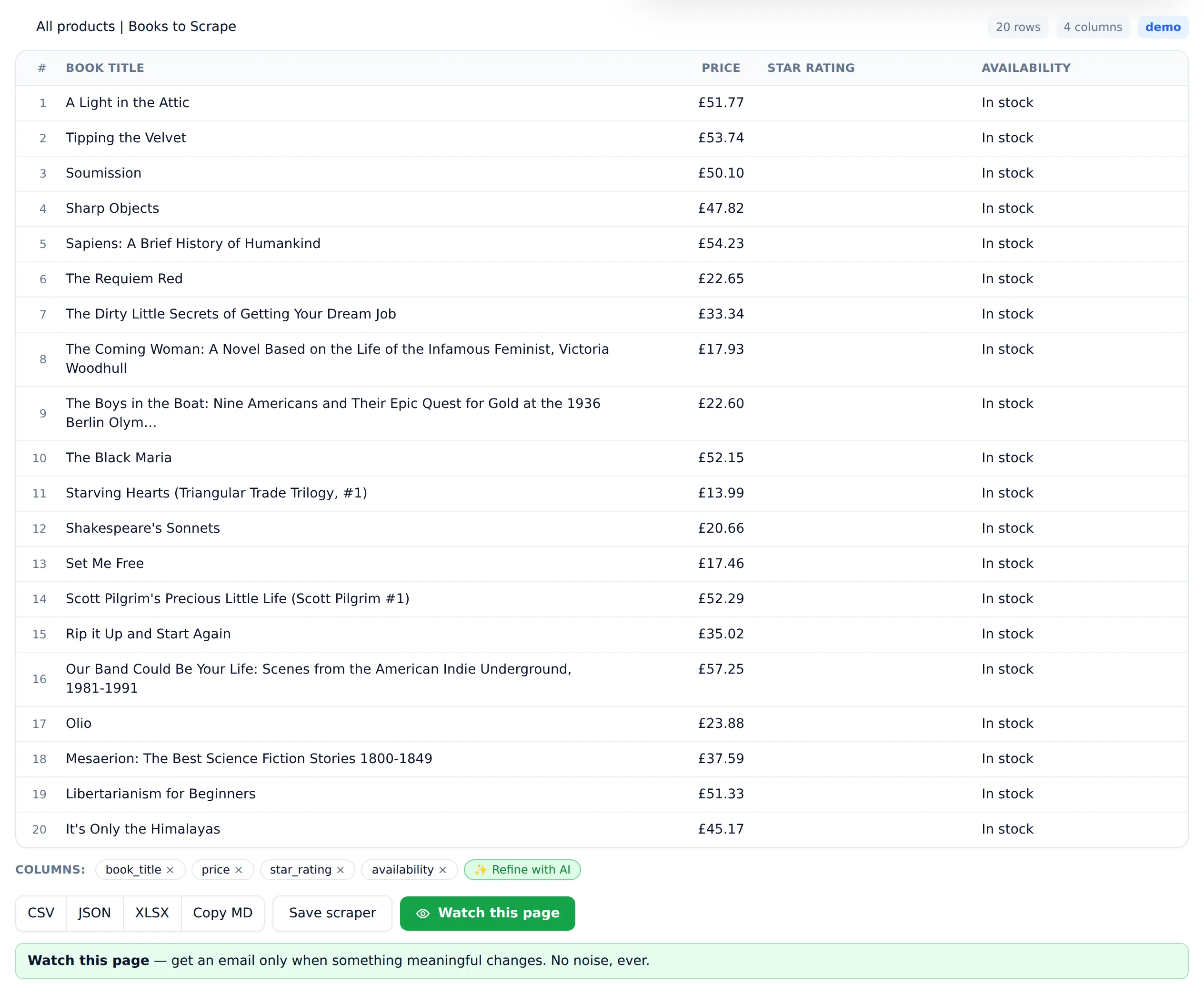
Step 2 — Paste the URL into Website Scraper. The page is fetched in a headless browser, so JavaScript-rendered content is included, and the AI reads the structure to find the repeating records and their fields. For the demo bookstore, that's 20 books with title, price, star rating, and stock status. No selectors, no configuration.
Step 3 — Review and refine the table. Check the columns against the page. If the AI grabbed a field you don't need, drop it; if it missed one, ask for it. Spend the 30 seconds. Fixing the shape of the data now is much cheaper than fixing it after you've scraped 200 pages. One page costs one credit, and failed scrapes are never charged — refunds are automatic — so experimenting on a difficult page is free.
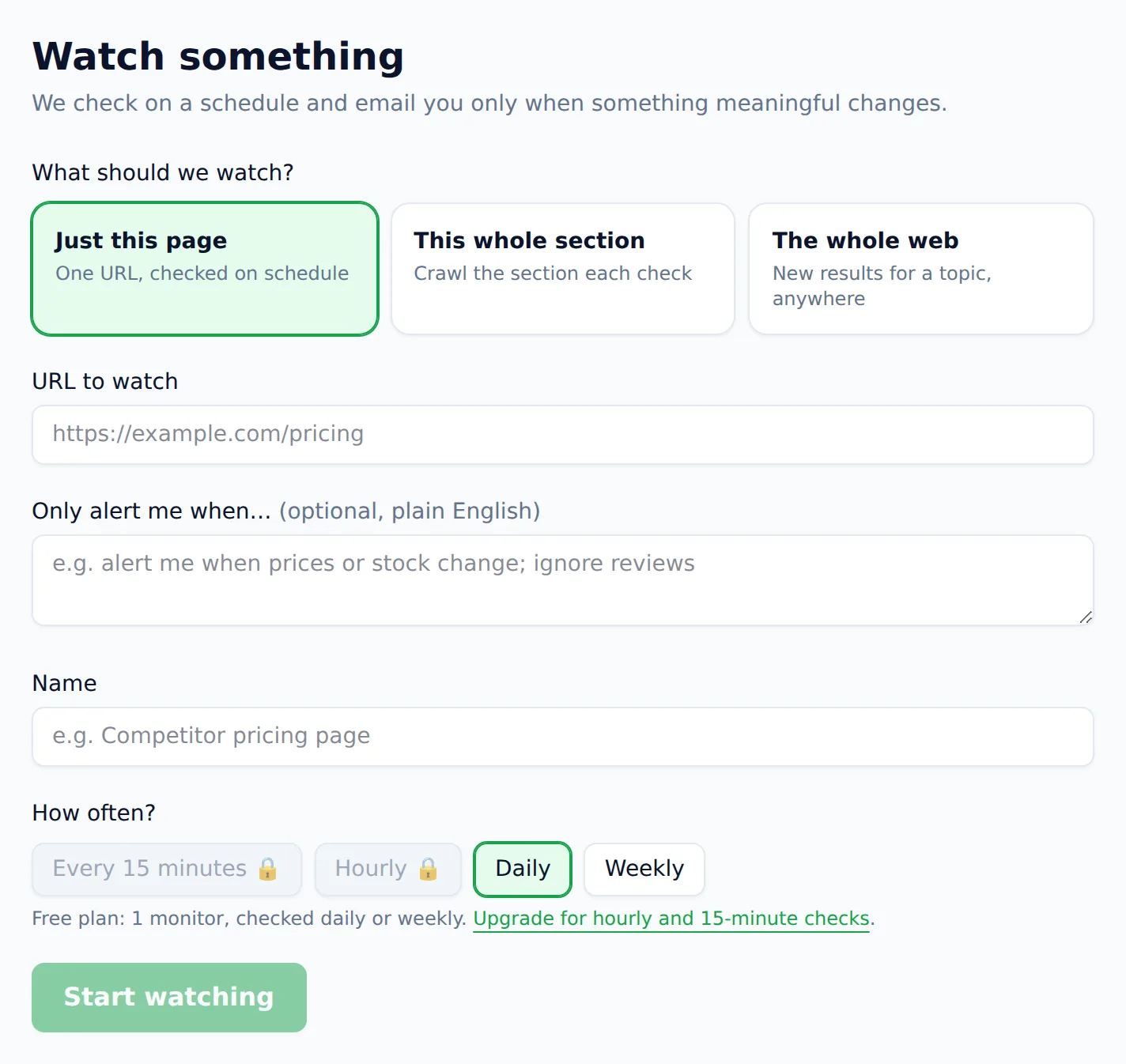
Step 4 — Export, save, or monitor. Download the table as CSV for Google Sheets or your database, or as a ready-to-open Excel file. If the page changes over time — prices, stock, listings — save the scrape and monitor it for changes instead of re-scraping by hand. Ordinary change detection cries wolf on every timestamp and rotating banner; monitoring here weighs each change against the alert rule you wrote and tells you why it alerted. That's the part that's genuinely painful to build yourself: scheduled scraping needs hosting, retries, storage, and diff logic before it needs anything else.
Scraping is only half the job — the file still has to tell you something. Once you have the export, you can analyze the CSV you scraped in plain English and get the trends, totals and outliers without opening a spreadsheet.
For multi-page data, like a paginated catalog, point the tool at the listing pages the same way — each page is one credit. The free tier's 25 pages a month covers most evaluation and small one-off jobs; the pricing page has per-page costs beyond that, starting at $19/month for 1,000 pages, with credit packs that never expire if your usage is bursty.
When should you write code instead?
Write code when scraping is one component in a larger system: custom logic during extraction, tight integration with your database or pipeline, authenticated multi-step sessions, or volumes where per-page pricing loses to engineering time. Code costs more upfront and in maintenance, but it has no ceiling.
Concrete signals that you've outgrown no-code tools:
- The scrape has branching logic. "Fetch the listing, and for every item cheaper than yesterday, fetch its detail page and its seller's page" — that's a program, not a paste.
- You're joining data mid-flight. Deduplicating against your existing database during the crawl, enriching rows with API calls, streaming into a warehouse. Code territory.
- Volume economics flip. At hundreds of thousands of pages a month, owning the scraper — proxy costs, maintenance, and all — can beat any per-page price.
- Compliance requires it. Some teams need scraping to run entirely inside their own infrastructure.
None of this is exotic. Python's requests plus BeautifulSoup covers static sites in an afternoon, and Playwright covers JavaScript-heavy ones. The step-by-step Python tutorial takes you from zero to a paginated, CSV-exporting scraper, with every snippet tested against a live site.
The two approaches also compose better than the "code vs. no-code" framing suggests. The pattern I'd actually recommend: prototype with the AI scraper to confirm the data is extractable and worth having — minutes, zero code — then decide whether the recurring version should be a saved monitor in the tool or a script in your pipeline. Prototyping in code first, before you know the data is any good, is the expensive order of operations.
What should you do first?
Run the two-minute test: paste your target URL into the free web scraper and see what comes back. If the table is right, you're done — export and move on. If it's close but not quite, refine it. And if the job turns out to be genuinely code-shaped — pipelines, logic, scale — you'll know within those two minutes, and a language tutorial is where to go next: Python, JavaScript, PHP, Ruby, Go, or Java. Either way you'll have spent minutes, not an afternoon, finding out which method your problem actually needs.