Website to Excel
Scrape Data From a Website to Excel
Paste a URL, get a clean table, and download it as a real Excel (XLSX) file — no code, no formulas, no copy-paste. The AI reads the page and builds columns you can sort and filter in Excel. The box below is already loaded with a page, so you can run it now.
- Real .xlsx, opens in Excel
- No signup for your first scrape
- Export free on every plan
- Failed scrapes are never charged
How to scrape data from a website into Excel
Three steps, under a minute, nothing to install. This is the whole process — the parts that used to mean Python, pandas.read_html, or an afternoon of copy-paste are handled for you.
Paste the website URL
Any public page with repeating data: a product catalog, a directory, a listings grid, a results table. Whole site sections and 100-URL batches merge into one sheet, with a page-count preview before you're charged a credit.
Get a clean, typed table
Name the columns you want or let the AI find the main table itself. It reads the fully rendered page the way you would and returns consistent columns — no selectors, no formulas, no copy-paste.
Download the Excel file
Click XLSX and you get a real .xlsx workbook — bold header row, one column per field, sized to fit — ready to open in Excel, Google Sheets, or Numbers. CSV and JSON are one click away too.
The table you export — a real run
Here's the exact table a scrape returns, and it's the exact shape the Excel file takes: one row per record, one column per field, headers on top. Below it is the app itself, where the XLSX button turns this into a workbook — the same view you'll see when you run the scrape above.
Real output — books.toscrape.com, the rows that become your spreadsheet
20 rows · tested October 7, 2026
| # | book title | price | availability |
|---|---|---|---|
| 1 | A Light in the Attic | £51.77 | In stock |
| 2 | Tipping the Velvet | £53.74 | In stock |
| 3 | Soumission | £50.10 | In stock |
| 4 | Sharp Objects | £47.82 | In stock |
| 5 | Sapiens: A Brief History of Humankind | £54.23 | In stock |
| 6 | The Requiem Red | £22.65 | In stock |
| 7 | The Dirty Little Secrets of Getting Your Dream Job | £33.34 | In stock |
| 8 | The Coming Woman: A Novel Based on the Life of the Infamous Feminist, Victoria Woodhull | £17.93 | In stock |
A real run against books.toscrape.com, a public demo bookstore. Our fresh test requested book title, displayed price and availability, and returned 20 rows with those three columns. Prices keep their displayed currency text; we don’t silently convert them into a different currency or number format.
Working with match scores and dates? Our tested football-data-to-CSV guide shows a second real export and explains how to keep scores as text.
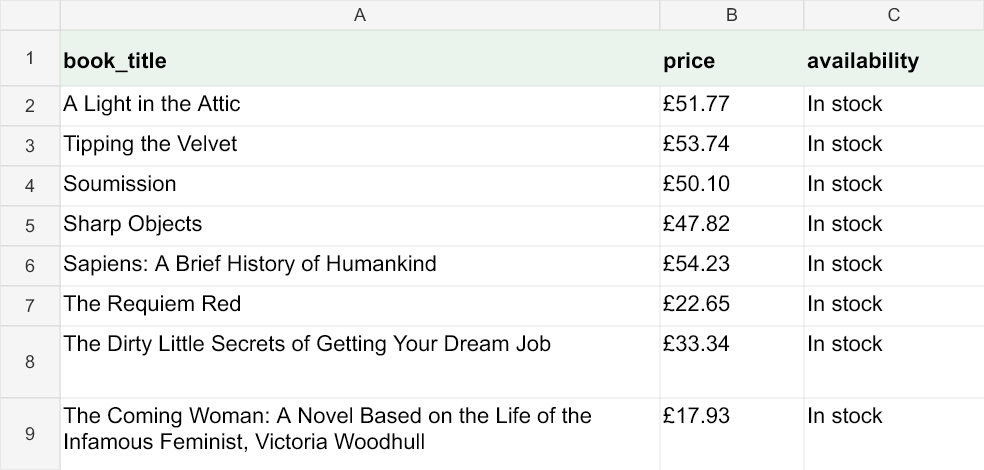
What you get in the Excel file
The download is a genuine .xlsx workbook, not a CSV renamed to look like one. It opens natively in Microsoft Excel, Google Sheets, Apple Numbers, and LibreOffice Calc, and it's built to be worked with the moment it lands:
- A Data worksheet with one row per record and one column per field — no merged cells to undo
- A bold header row using the column names you chose, so the sheet is readable at a glance
- Readable column widths, wrapped text, a frozen header and filters
- Values preserved as returned: numbers stay numeric; displayed currency and score strings stay text
- A Source sheet records the original page URL and export time when you export from the scraper
- Need CSV or JSON instead? Same table, one click — Excel is just the default most people want
Prefer the raw walkthrough of the scraping half? The guide on how to scrape data from a website covers the general workflow, and web scraping without code explains why an AI reader beats point-and-click selectors.
Excel (XLSX)
Most popularA real workbook with a bold, frozen header, filters and readable columns — open it in Excel, Sheets or Numbers.
CSV
UTF-8 with a byte-order mark so Excel opens accented text correctly. The universal import format for databases and other tools.
JSON
The same rows as structured records, for feeding an app, a script, or an AI agent instead of a spreadsheet.
Excel web scraping with Python, and when it's worth it
Plenty of people searching for a way to scrape a website into Excel are really asking whether to write it in Python. The honest answer: Python is the better tool when the job is genuinely programmatic — you need it inside an existing pipeline, you're joining the scrape against a database, or the output feeds code rather than a person.
The short version of the Python route is requests to fetch, BeautifulSoup to parse, and pandas.DataFrame.to_excel() to write the .xlsx. For a static HTML table, pandas.read_html() can do it in two lines. Our Python web scraping tutorial walks the whole thing end to end, including pagination and export.
Where Python gets expensive is everything after the first run. JavaScript-rendered storefronts need a headless browser, blocked requests need proxies and retries, and every site redesign breaks the selectors you wrote — which you find out from a spreadsheet of empty cells. If the goal is simply a spreadsheet of this page's data, the no-code path above gets you there in about thirty seconds with nothing to maintain. Use Python when you need the code; use this when you need the numbers.
Keep the spreadsheet up to date automatically
An exported sheet is a snapshot — accurate the moment you downloaded it, stale the moment the page changes. If the data matters over time, save the scrape as a monitor: we re-run it on a schedule, email you when the numbers actually move, and let you re-export a fresh .xlsx in one click. It's the no-code version of a scheduled Power Query refresh, without a database connection to babysit.
See how to monitor a website for changes, or if you're tracking store prices specifically, the website price scraper is this same flow tuned for catalogs and price drops.
What does it cost to scrape a website to Excel?
Excel export is free on every plan, including the free one. One credit scrapes one page — a category page of products is a single credit, whatever the row count. The free plan gives you 25 credits a month with no credit card; beyond that, plans start at $19/month for 1,000 pages, and $49/month adds hourly monitoring and API access. One-time credit packs — $9 for 300, $29 for 1,200 — never expire, and failed scrapes are always refunded. The full pricing page lays out every tier.
Scrape-to-Excel FAQ
- How do I scrape data from a website into Excel?
- Paste the page's URL into the tool, let the AI read the page and build a table, then click XLSX to download an Excel workbook. There are no formulas, macros, or Power Query steps to set up — the whole path from URL to an .xlsx you can open takes under a minute, and your first scrape runs on this page without an account.
- Does the export open in real Excel, or just look like a spreadsheet?
- It's a real .xlsx workbook in the standard Office Open XML format — not a CSV renamed to look like one — so Microsoft Excel, Google Sheets, Apple Numbers, and LibreOffice Calc all open it natively. Each scraped column becomes a real worksheet column with a bold header row, sized to its content — a normal spreadsheet you can sort, filter, pivot, and write formulas against.
- Can I choose which columns end up in the spreadsheet?
- Yes. Type the columns you want in plain English ("product name, price, and availability") and the AI returns exactly those, or leave it blank and it detects the main table itself. Before you export you can drop a column you don't want or ask the AI to add one, so the workbook has the shape you need rather than everything on the page.
- Do prices and numbers come through as numbers I can add up?
- Each value lands in its own cell exactly as the page presented it, so a plain number arrives ready to sum and sort, while a value written with a currency symbol or unit (like "£51.77") comes through as text — the same as any copy-paste would. A quick Find & Replace or Value formatting in Excel turns those into numbers when you need arithmetic. Nothing is silently altered, so what you see on the page is what you get in the cell.
- Can I scrape multiple pages into one Excel file?
- Yes. Point the tool at a paginated catalog or a whole site section and every page merges into one table before you export, with a page-count preview so you know the cost first. You can also paste up to 100 URLs as a batch and get a single combined workbook — one download instead of stitching sheets together by hand.
- Can I keep the spreadsheet up to date automatically?
- Yes — that's the difference between a one-time export and a living dataset. Save the scrape as a monitor and we re-run it on a schedule; you get an email when the underlying data changes, then re-export a fresh .xlsx in one click. It's the no-code version of a scheduled Power Query refresh, without a database connection to maintain.
- Is it free to scrape a website into Excel?
- The first scrape on this page is free with no account, and a free plan adds 25 page credits a month and no credit card. One credit scrapes one page — a category page of products is a single credit whatever the row count — and failed scrapes are refunded automatically. Excel, CSV, and JSON export are included on every plan, including the free one.
Want the same table anywhere else? The AI website scraper on the homepage is the same tool for any kind of page, and export to CSV or JSON is always one click from the Excel button.
Turn a web page into a spreadsheet now
Paste a URL at the top of the page and run your first scrape free, no account needed. When the table looks right, one click downloads it as an Excel file.