Website change monitoring
Monitor Any Website for Changes
Scrape a page into a clean table, then watch it. Write an alert rule in plain English and get one email only when something that actually matters changes — a price, a listing, a policy, a version. No code, no page-diff spam. Run the scrape below, then turn it into a monitor in one click.
- Alerts read against your own rule
- No signup to try the scrape
- Free plan includes a monitor
- robots.txt honored
What does it mean to monitor a website for changes?
Monitoring a website means checking a page on a schedule and being told when something on it changes — without you re-opening the tab every morning. The hard part was never the checking; it's deciding what counts as a change worth interrupting you for. A raw diff treats a rotated banner and a dropped price as equally important, so the useful signal drowns in noise and you stop reading the alerts.
Website Scraper starts from the scrape instead of the diff. You capture the page as a clean table once, then write an alert rule in your own words. Every later check is read against that rule, so you're emailed about the price drop and never about the banner. The section below is a real scrape of a live page — the same table a monitor would use as its baseline.
Real baseline — books.toscrape.com, the table a monitor would watch
20 rows captured in about twelve seconds
| # | book title | price | availability |
|---|---|---|---|
| 1 | A Light in the Attic | £51.77 | In stock |
| 2 | Tipping the Velvet | £53.74 | In stock |
| 3 | Soumission | £50.10 | In stock |
| 4 | Sharp Objects | £47.82 | In stock |
| 5 | Sapiens: A Brief History of Humankind | £54.23 | In stock |
| 6 | The Requiem Red | £22.65 | In stock |
A real run against books.toscrape.com, a public demo bookstore with live prices and stock — the safe, repeatable target we test against. Save this exact scrape as a monitor and a rule like “alert when any price or stock status changes” is watching those columns from then on. Run it yourself in the box above.
How do you monitor a website for changes?
Three steps, under a minute, nothing to install. The parts that used to need a script and a cron job are handled for you.
Scrape the page once
Paste the URL and get a clean table — the baseline the monitor compares against. The box below is already loaded with a live page, so you can run it now and see exactly what a watch would track.
Write the alert rule
Say what matters in plain English — “tell me when a price drops or something goes out of stock; ignore reviews and reordering.” No selectors, no regex. The rule is what turns a noisy diff into a signal you'll actually read.
Pick a schedule and forget it
Daily, hourly, or every 15 minutes, all in the cloud. Each check appends to a change timeline, and only changes that match your rule earn one summary email — with the reason it fired attached.
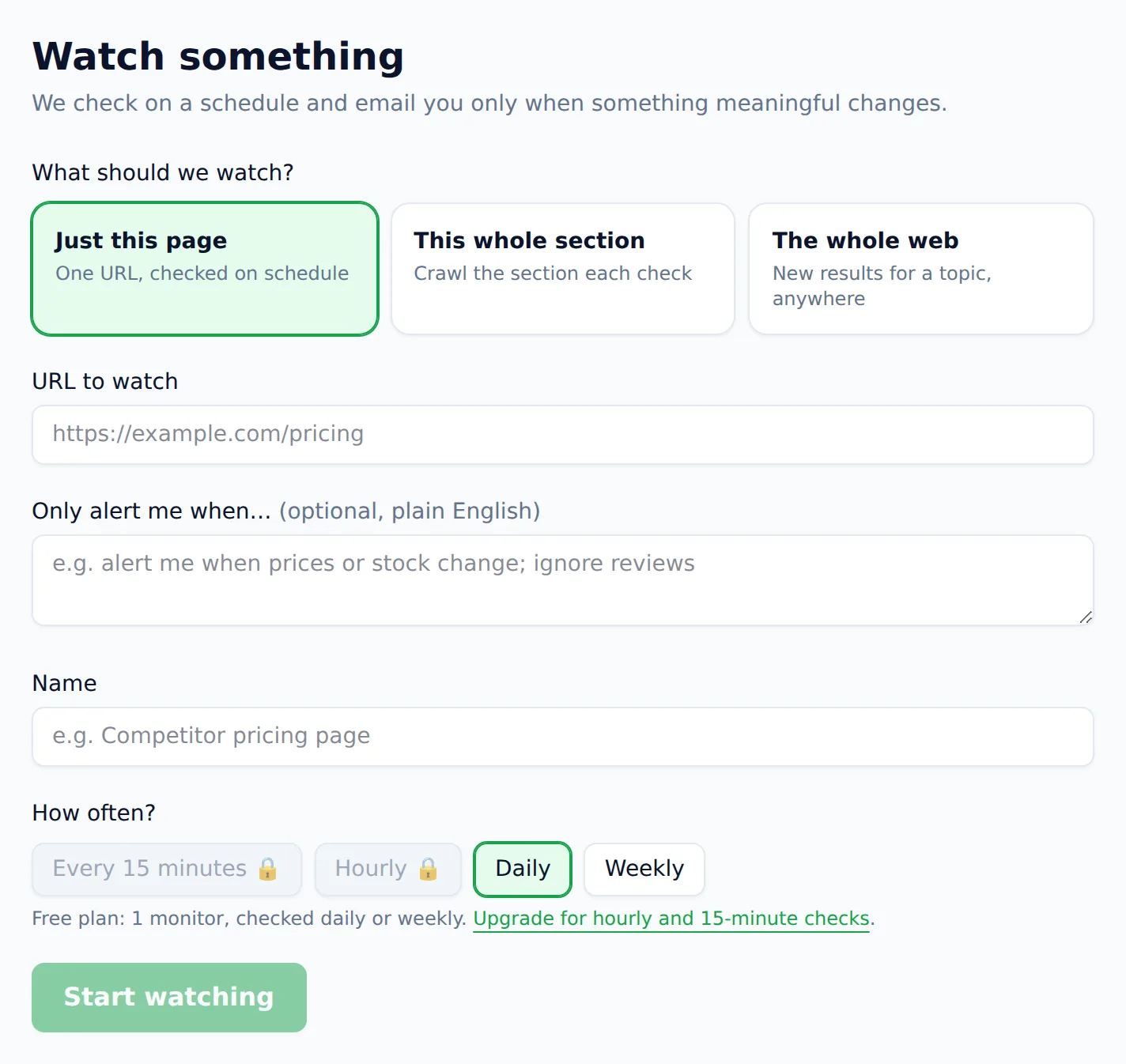
Watch one page, a whole section, or the entire web
A monitor isn't limited to a single URL. Pick the scope that matches the question you actually have — from “did this one page change?” to “did anyone, anywhere, publish something new about this?”
Just this page
One URL, on schedule
Watch a single product, pricing page, changelog, or policy document. The most common watch — point it at the one page whose changes you care about and let it re-check on its own.
This whole section
Re-crawled each check
Watch a category, a job board, a docs tree, or a listings directory. We re-crawl the section on every check and tell you what's new, gone, or edited — good for “any new posting anywhere under here.”
The whole web
New results for a topic
Don't have a URL yet? Describe a topic — a brand, a product name, a regulation — and we run standing searches, then alert you when genuinely new pages appear anywhere on the web.
The alert rule is the whole product
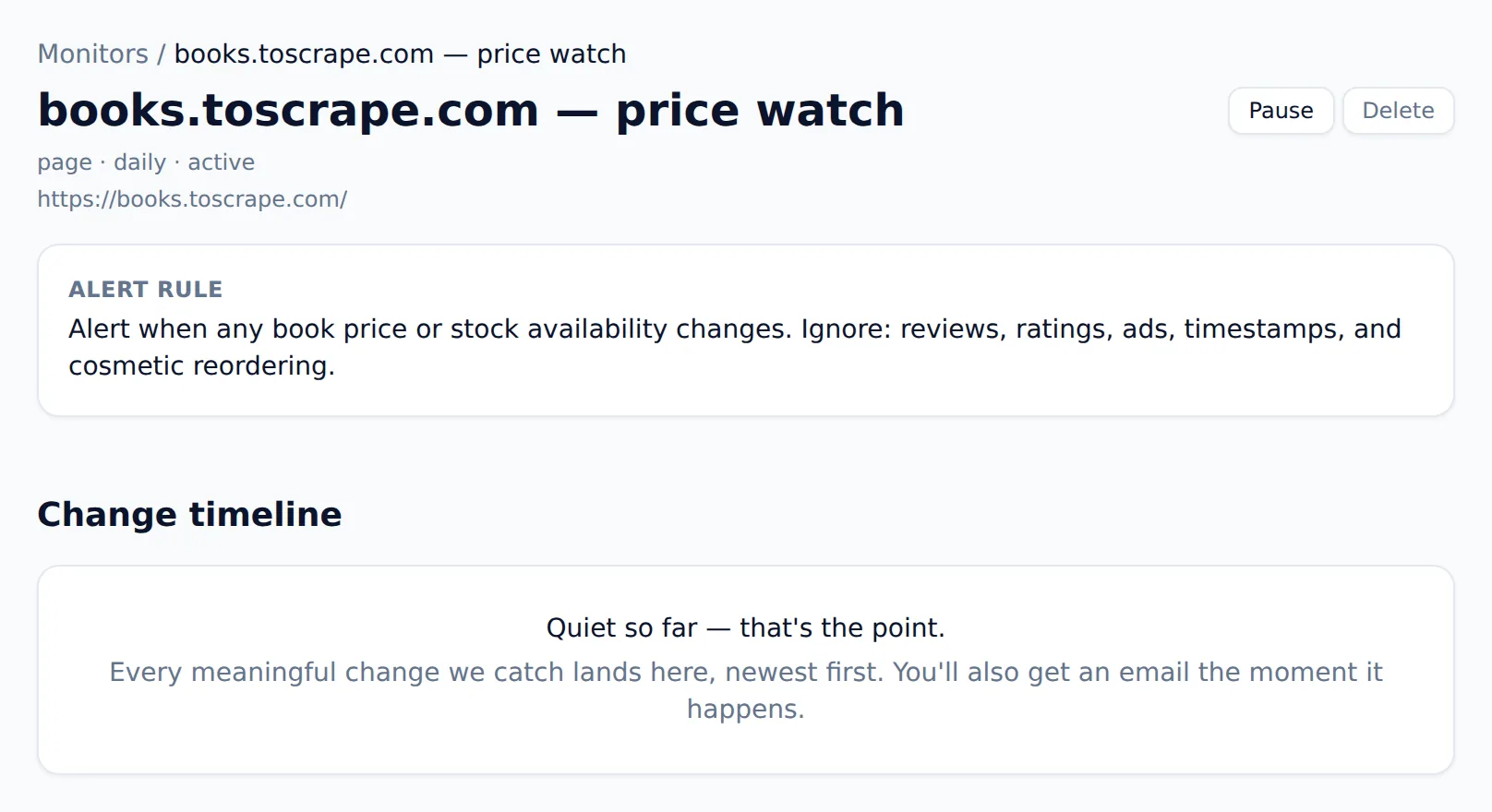
Change detection is easy; useful change detection is not. The difference is a rule written in language, not a threshold or a CSS selector. You write it the way you'd brief a colleague — “email me when a tier price or a headline feature changes; ignore blog posts, testimonials, and the cookie banner” — and every detected change is read against it before anything is sent. Only matches reach your inbox, each with the reason it mattered spelled out.
- Write the rule in plain English — no selectors, thresholds, or regex to maintain
- Cosmetic edits, timestamps, rotating ads, and reordering stay silent by default
- Daily, hourly, or 15-minute checks run in the cloud, not your browser
- Every change lands in a timeline you can scroll back through, newest first
- One summary email per check — a digest of what changed, not one email per row
- Alerts are signed and automatically retried, so a blip never means a missed change
How often should you check a page?
Match the cadence to how fast the page actually moves. A competitor's pricing page rarely changes twice in a day, so a daily check is plenty; a limited-drop product or a fast-moving job board earns hourly or 15-minute checks. Every plan includes monitoring — the free plan gives you one daily monitor — and faster cadences and more monitors come with the paid tiers. Checks run on our servers, so nothing has to stay open on your machine.
What people watch
The pattern is always the same — a page whose changes you can't afford to miss, and no desire to check it by hand. A few of the jobs people bring to website monitoring:
Competitor pricing and features
Watch a rival's pricing or product page and get one clear email when a tier, price, or headline feature moves. Marketing copy churn stays out of your inbox.
Price drops and restocks
Track a product or catalog and hear about a price cut or a back-in-stock the moment it happens.
See the price scraperNew job or listing postings
Watch a careers page or marketplace as a section and catch new roles or listings the hour they appear — no more daily manual refresh.
Policy, terms, and docs
Get told when a supplier's terms, an API's docs, or a regulation page is edited — with the changed paragraph called out, not the whole document.
Brand and topic mentions
Use a whole-web watch to catch new pages mentioning your brand, product, or a topic you follow, anywhere they get published.
Content and changelog updates
Watch a changelog, a release page, or a rankings table and let a version bump or a new entry come to you instead of the other way around.
Every one of these starts with a scrape, so the same tool that builds your table keeps it current. If you're new to the workflow, the guide on how to scrape data from a website covers the scraping half, and the AI website scraper on the homepage is the same engine for any kind of page.
Is it OK to monitor a website?
Watching a public page for factual changes — prices, stock, listings, published policies — is a routine, defensible thing to do, but being a considerate visitor still matters. The responsible defaults are baked in: Website Scraper honors robots.txt, refuses sensitive categories like banking, government, and people-search, and checks on sensible schedules instead of hammering a site. It never reaches behind a login you don't own, and it won't collect personal data that laws like GDPR and CCPA protect.
For a deeper look at where the lines are, see whether web scraping is legal in depth. This page is general information, not legal advice — if the stakes are high, talk to a lawyer about your specific use.
What does website monitoring cost?
Monitoring is included on every plan. The free plan gives you 25 page credits a month and one daily monitor with no credit card — enough to watch a page that matters and see the workflow end to end. From there, $19/month runs 5 monitors, and $49/month adds hourly checks, 25 monitors, signed webhooks, and API access. A check spends one credit per page fetched, and failed checks are refunded automatically. One-time credit packs — $9 for 300, $29 for 1,200 — never expire. The full pricing page lays out every tier and its monitor limits.
Website monitoring FAQ
- How do I monitor a website for changes?
- Scrape the page once to capture a baseline table, then click "Watch this page" and write an alert rule in plain English — for example "tell me when a price or the stock status changes." We re-check the page on the schedule you pick and email you only when a change matches your rule. Nothing to install, and the checks run in the cloud, so your computer doesn't need to stay on.
- How is this different from a page-diff or change-detection tool?
- Most change detectors diff the raw HTML and email you on every difference — a rotated ad, a new timestamp, a reshuffled review. Website Scraper reads each detected change against the alert rule you wrote and only sends the ones that match, with the reason it mattered spelled out. The phrase we hold ourselves to is "no noise, ever": cosmetic edits stay silent so a real change never gets buried.
- Can I watch a whole section of a site, not just one page?
- Yes. A monitor can watch a single page, a whole section (we re-crawl the section on each check and compare it), or the entire web for a topic — where we run standing searches and alert you when genuinely new results appear. Section and web watches are how people track "any new job on this board" or "anyone publishing about our brand" without babysitting a dozen tabs.
- How often does it check for changes?
- Daily on the free and Starter plans, hourly on Pro, and every 15 minutes on Business and Scale. Each completed check appends to a change timeline you can scroll back through, and you get at most one summary email per check — a batch of what changed, not one email per changed row.
- What kinds of changes can it alert on?
- Anything that shows up as text or structured data on the page: a price or stock change, a new row in a listing, an edited headline or feature, a changed policy paragraph, a new job posting, a version bump on a changelog. You describe what matters in your own words and the alert rule decides — so "alert on price drops, ignore reviews" and "alert on new postings, ignore the sidebar" behave exactly as written.
- Do I get an alert when nothing important changed?
- No — that's the whole point. If a check runs and nothing matches your alert rule, the change lands quietly in the timeline and no email is sent. You only hear from us when something you asked about actually moved, and every alert says why it fired so you can trust it without re-checking the page yourself.
- Is it legal and polite to monitor a website?
- Monitoring public pages for factual changes — prices, availability, listings, published policies — generally sits on solid ground, but be a considerate visitor. Website Scraper honors robots.txt, refuses sensitive categories like banking and people-search, checks on sensible schedules rather than hammering a site, and never touches anything behind a login you don't own. Watching a page you're allowed to view, on a reasonable cadence, is the responsible default here — this is general information, not legal advice.
- Can I get change alerts somewhere other than email?
- Every plan sends email alerts. Pro and above also send signed outbound webhooks on each completed check, so you can route changes into Slack, a database, or your own automation. Alerts are signed and automatically retried, so a momentary blip on your end never means a silently missed change.
Comparing tools first? Browse AI is the name most people reach for on change monitoring — the Browse AI alternative comparison weighs it against Website Scraper on alert quality and price, and the round-up of the best AI web scrapers covers the monitoring angle across the field.
Scrape a page now — then watch it
Paste a URL at the top of the page and run your first scrape free, no account needed. When the table looks right, one click turns it into a monitor that emails you only when a change matches the rule you wrote.